

I don’t know why but Google seems to go out of its way to make sure that you lose money when advertising on their Adwords platform.
Not only is the interface overly complicated but there are so many bells and whistles that even experienced advertisers can get confused.
It also doesn’t help that Google offers “free consultations” to show new users how to waste even more money than they could on their own.
In fact, convincing my students how to use Adwords the right way for a small business has been challenging because much of what I teach goes directly against Google’s “automated” advice.
Anyway today, I’m going to provide a Google Adwords tutorial on what not to do and discuss the common mistakes that new users make.
In addition, I’ll present some real data from student shops in regards to an inexpensive Adwords service that I’ve been evaluating for the past several months.
Get My Free Mini Course On How To Start A Successful Ecommerce Store
If you are interested in starting an ecommerce business, I put together a comprehensive package of resources that will help you launch your own online store from complete scratch. Be sure to grab it before you leave!
Table of Contents
Mistake #1: Listening To Google’s Recommendations

First, let’s cross off the most common Google Adwords mistake that almost ALL newbies make.
Never ever listen to Google’s bidding advice….ever!!. Their suggestions will only lead you to spend more money on their platform without taking conversions into account.
One time, I spent an hour coaching one of my early Create A Profitable Online Store students on how to run profitable ads using a slow, methodical bidding strategy.
And after we got off Skype, I felt confident that he knew what to do. But as soon as he signed up for Adwords, he got a call from a Google employee offering him a “free consultation”.
Wow! Someone who works at Google offering free advice? Sign me up!
So instead of listening to what I taught him, he went ahead and had Google setup his account and run his ad campaigns.
Well guess what? Google blew through over $250 in a single day ($100 of this was free credit from Google) with zero conversions!
And when he complained to Google, they reassured him that they needed to gather a lot more data in order to make his ads profitable.
Two weeks later, he was out almost $1000 with no conversions to show for it. Another two weeks later, he had burned through almost $2000 with only a single sale!
Now imagine launching a brand new online store with a limited budget and burning through thousands of dollars in a such a short period of time! It sucks!
Google’s Advice Is Not Meant For Small Businesses

By the time he told me what happened, it was already too late. But I did have the opportunity to take a look at how they had setup his account.
First off, Google went all out with the Google Display Network and paid top dollar to place ads on popular blogs and apps.
For all of you who are unfamiliar with Google Display Ads, ads on the Google Display Network show up as banner ads on popular blogs, android apps and other applications across the web.
Traditionally, it is very difficult to make GDN ads profitable because it takes a lot of money and trial and error to figure out what and where to run your ads. I definitely don’t recommend it for beginners.
Anyway, his average cost per click was somewhere in the neighborhood of $1 per click and they set up over 20 ad groups.
The end result was that the display network ate up hundreds dollars per day very quickly with no sales.
In terms of search ads, the Google consultant chose to go all out and purchased a variety of “broad match” keywords to bid on that were all over the place.
But here’s the kicker. They pointed the majority of the ads to his “About Us” page instead of his product category pages!
Anyway, the upshot of all of this is that…
- You should avoid letting a Google consultant run your campaigns
- You should avoid running ads on the Google Display Network early on
- You should avoid using a lot of broad match keywords if you have a limited budget
Their tactics may work for large corporations but definitely not for smaller stores with limited budgets.
Mistake #2: Using Google Adwords Express And Letting Google Manage Everything
I had another student try to take the “easy way out” by signing up for Google Adwords Express.
For all of you who are unfamiliar with this program, Google Adwords Express promises to manage all of your ads “without the need for daily management or tasks”.
Wow! Sounds great! Google manages everything for me and all I have to do is sit back and relax!
As always, when something sounds too good to be true, it usually is.
First off, Google Adwords Express ads are always set up to use “Broad Match” keywords which means that you’ll get a lot of garbage queries to your site.
Second of all, there is no option to add “negative keywords” which means you can’t filter out the bad search terms from your campaigns.
And finally, there’s limited conversion tracking with Adwords Express which makes it almost impossible to run an effective ad campaign.
Bottom line, avoid Google Adwords Express at all costs!
Mistake #3: Blaming Adwords When Your Website Sucks
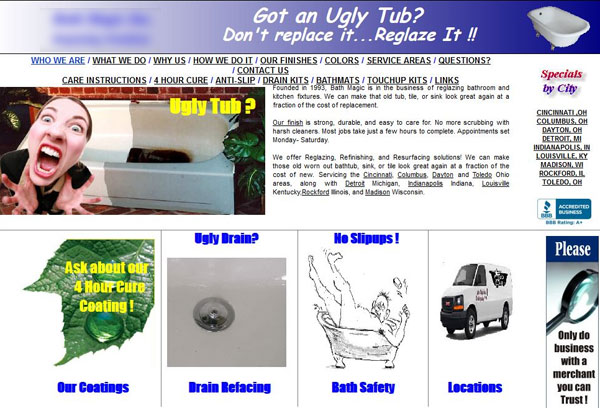
Perhaps the most important rule of Google Adwords is to always blame your website first when you aren’t making sales.
Here’s what I’ve discovered while teaching my class for the past 5 years.
Whenever someone follows my Adwords strategies but can’t get Adwords to work, 9 times out of 10 it’s their website that is crappy and not the traffic.
When you are first starting out on Adwords, you should ONLY bid on your targeted keywords using “exact match”.
If you can’t make a sale on your website with “exact match” keywords with at least a 2% conversion rate, there’s something wrong with your site.
It could be your value proposition. It could be the lack of trust. It could be your lack of selection.
If your conversion rates suck, my advice is to install a tool like HotJar to figure out how people are browsing your site and look for hotspots.
Make sure that you have an attractive design that inspires trust in your customers and clearly outlines your unique value proposition.
For more information on how to create a high converting website, please refer to my post on The Exact Steps I Took To Increase Conversion Rates 42% For My Online Shop
If You Still Can’t Figure Out Adwords, Try This…

Now that I’ve pointed out the gross newbie mistakes and totally scared you off the Adwords platform, I wanted to talk about a cool solution that I recently discovered to make Adwords much easier to use.
First off, if you don’t have the desire to deal with Adwords at all, you have a few options.
One, you can avoid running Adwords campaigns altogether and miss out on an incredible channel for sales.
Two, you can hire a consultant, pay a monthly fee and leave your ad campaigns and your credit card in the hands of a complete stranger.
For me personally, I always run my own ads because I want to preserve my margins. Consultants are expensive and can quickly eat into your profits.
Here’s a quick and dirty example to put things in perspective.
Let’s say you have a 50% margin on your products. This means that you need at least a 2X return on ad spend just to break even.
If your margins are 33%, then you need a 3X return.
Any additional fees spent on a consultant can majorly eat into your bottom line.
But what if you could pay someone a fixed monthly fee to drive targeted traffic to your site on the order of pennies per click?
What if you didn’t have to learn how to use Adwords at all and have someone do everything for you for one low flat monthly rate?
I was pretty skeptical that this was possible until I evaluated Storeya’s Traffic Booster service.
Enter The StoreYa Traffic Booster

First off, I want to say that this service is not for everyone and your results may vary. But for 2 out of the 3 student websites I tried it on, it worked quite well.
For just $25, StoreYa will drive 500-1000 targeted leads using Adwords to your site.
Note: Storeya’s normal plan costs $44.99 for up to 500 visits but they are offering a special $25 plan for up to 1000 visits for MyWifeQuitHerJob.com readers to try.
If you do the math, that works out to 5-10 cents per visitor!
If your site converts at just 1%, that means you’d get 5-10 sales for just $25!
Here’s how it works.
First, you have to sign up for Storeya’s Traffic Booster Service
Storeya will then ask you to specify your website URL and to place an Adwords conversion pixel on your site.
They will then scrape your site for the most optimal keywords and start running Adwords campaigns using THEIR account.
In other words, you don’t even need an Adwords account to use their service.
Sound too good to be true?
Admittedly, my bs-o-meter starting buzzing when I heard this because I rarely get 5-10 cent clicks on any of my Adwords campaigns.
But curiosity got the best of me so I reached out to StoreYa’s founders and arranged to have free accounts created for 3 lucky students in my class as a case study.
Below are their results with StoreYa’s Traffic Booster Service.
SunnyDecals.com

Sunny Decals is an ecommerce store that sells wall decals online and it’s run by one of my students named Ron. You can check out his store here
For Sunny Decals, the Storeya Traffic Booster Service generated 3 conversions based on 273 clicks which is roughly a 1% conversion rate.
The average order value was roughly $30 which means that Ron would have spent $25 to make $90.
Because his margins are north of 66%, this campaign was definitely profitable.
Note: A reader pointed out that the $25 cost is only for the first month. The plan that Ron was on would normally cost $44.99 /month for up to 500 visits.
At his margins, the campaign was still profitable. Your results with StoreYa will depend on your site quality and your margins.
Right now, he is paying for a regular priced plan.
I see value in the product. Traffic was less than estimated but they successfully chose good traffic and it’s something that I’d be interested in continuing
CamoEverAfter.com
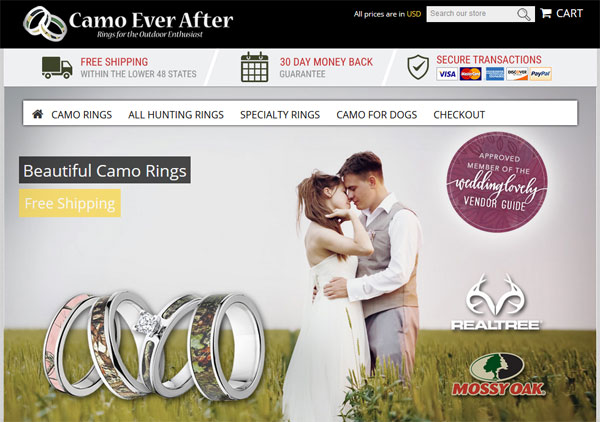
CamoEverAfter.com is an ecommerce store run by my student Yvette that sells camo wedding rings online. You can check out her store here
For CamoEverAfter, Storeya generated 2 conversions based on 826 visits which is a .25% conversion rate.
Now on the surface, this conversion rate is horrible. But here’s the thing. Those 2 sales generated $442 in revenue.
And at their current margins, their profits greatly exceeded the $25 they would have paid Storeya for the plan.
MamooKids.com
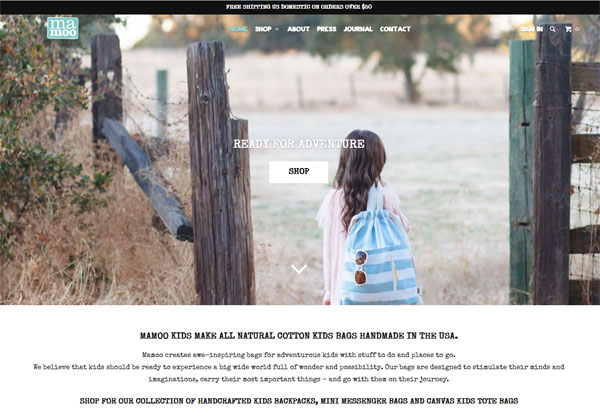
Finally, I also had Storeya drive traffic to Mamoo Kids which is a student store that sells kids messenger bags.
Unfortunately for this store, Storeya generated no conversions at all.
When I asked Storeya for possible reasons why, they told me that…
- Their bidding algorithm tends to work better with stores that have larger selections of product. MamooKids only sells a small number of items
- They needed some more time to optimize the campaigns. The longer you allow them to drive traffic, the better their ads become because they can refine their keyword terms.
Conclusion
The StoreYa traffic booster may not work for all stores, but at only $25 for 500-1000 clicks, it’s risk free to give it a try. (Note: this price is only for MyWifeQuitHerJob readers)
And in the event that their tool is profitable, it becomes a no brainer to max out your account.
To this day, I’m still amazed at how they can drive traffic so cheaply so I took a peek under the hood using some Adwords keyword spy tools.
It turns out that Storeya is able to generate cheap traffic because their software picks extremely long tail keywords to bid on at a very low cost.
If you were to try to do this on your own, it would be super tedious. But their software allows the bidding to all be automated.
Give it a try to see if it works for your shop! If the traffic they are sending is profitable, then stick with it. If it doesn’t convert, then cancel. You have nothing to lose and $25 is worth a test.
Click here to try the StoreYa traffic booster for only $25
photo credit: Exeter near Moss Vale. Old store now an antiques centre.frustration-1081

Ready To Get Serious About Starting An Online Business?
If you are really considering starting your own online business, then you have to check out my free mini course on How To Create A Niche Online Store In 5 Easy Steps.
In this 6 day mini course, I reveal the steps that my wife and I took to earn 100 thousand dollars in the span of just a year. Best of all, it's free and you'll receive weekly ecommerce tips and strategies!
Related Posts In Google Advertising Strategies
- Google Search Ads Tutorial – How To Buy Cheap Targeted Traffic With Storeya
- Bing Search Ads – How I Made An Extra $3253 Last Month With A Few Clicks Of The Mouse
- Best Comparison Shopping Sites – Google Shopping Vs Nextag Vs Bing Vs Shopping.com
- Google Shopping Ads Explained In One Simple Step By Step Guide
- Adwords Express – Are Google Smart Campaigns A Waste Of Money?

Steve Chou is a highly recognized influencer in the ecommerce space and has taught thousands of students how to effectively sell physical products online over at ProfitableOnlineStore.com.
His blog, MyWifeQuitHerJob.com, has been featured in Forbes, Inc, The New York Times, Entrepreneur and MSNBC.
He's also a contributing author for BigCommerce, Klaviyo, ManyChat, Printful, Privy, CXL, Ecommerce Fuel, GlockApps, Privy, Social Media Examiner, Web Designer Depot, Sumo and other leading business publications.
In addition, he runs a popular ecommerce podcast, My Wife Quit Her Job, which is a top 25 marketing show on all of Apple Podcasts.
To stay up to date with all of the latest ecommerce trends, Steve runs a 7 figure ecommerce store, BumblebeeLinens.com, with his wife and puts on an annual ecommerce conference called The Sellers Summit.
Steve carries both a bachelors and a masters degree in electrical engineering from Stanford University. Despite majoring in electrical engineering, he spent a good portion of his graduate education studying entrepreneurship and the mechanics of running small businesses.





Steve,
I usually LOVE your information, but after checking out store ya, I find that it’s only $25 for the first month. Then it’s $99. I felt kinda mis-lead.
Hey Betsy,
The payments are based on how much traffic you send. I think there’s a $29 plan for up to 500 visits.
Bottom line…if it converts and you make a profit, then you keep going. If not, you stop after a month. It’s that simple.
There’s no subscription or obligation
Hi Betsy,
I just updated the post to reflect the regular cost of the cheaper 500 visits plan. Thanks and sorry for the confusion.
I love the sunny decals website! Is there a way to know what shopping cart he uses and what theme? Looking for something similar.
Thanks for this great info Steve! Thanks also for letting me try this out. Yes, I think having a large product selection of a keyword you’re targeting is helpful! Also my target is a homeschoolers, which doesn’t seem too obvious at first, but it would probably influence the types of LT keywords I would pick. . .
Hi Steve,
I read this post when it first came out and signed up with Storeya. Based on your samples, I was expecting something but was also prepared for nothing. I also passed the link onto a friend.
We each signed up for the $25 trial. We each submitted our preferred demographics and we each expected to receive a minimal consultation regarding any suggestions from Storeya on what we could d on our end to optimize the landing pages they wished to use in the campaign.
My friend also signed up for some one on one consultation using their availability calendar to best accommodate their schedule.
The results were dismal at best. The promised 500 and delivered 300. Less then 5 percent were from my chosen demographic area which is where my customers live. When the trial period ended, I received an email notifying me that they charged my card for $100. I immediately responded that I was not continuing with them and to reverse the charge on my card. The responding email suggested I go to their consultation calendar and schedule a meeting. I informed them my friend had set up 4 meetings with them using their calendar and was not contacted by anyone at any of the selected times. They also do not respond to phone calls.
I reiterated that I wished a refund and after 4 days of no response, I filed a dispute with my credit card provider to reverse the charges, which they did.
My friend experienced the same thing and ended up canceling his card.
StoreYa earns an unqualified D- at best. A little customer service might have made a difference but they failed at that too.
Hi Chris
Thank you for your feedback!
I would first of all like to apologize for the experience you describe on your comment – this is not the experience we are used to provide and we will be sure to check how come this was the experience you had with us.
1. Reviewing your campaigns we see that you have requested for US users, and these are the users that Google AdWords was set to drive you with see this report: http://www.storeya.com/Uploads/EmailMedia/6f9ebb96.png
2. We provided you with 291 visitors from AdWords + 250 visitors from the media buying channels we manage for you, so the total delivery was for 541. Judging by the numbers you stated, we can assume you only counted the AdWords efforts, but the media buying ones can sometime be as effective as AdWords (we shift the efforts according the performance).
Here is your daily Traffic report: http://www.storeya.com/Uploads/EmailMedia/29a6c563.png
3. Two thirds of the merchants that signed up to our Traffic Booster after reading this post have had profitable campaigns within their first month.
For some campaigns it takes more time and optimization efforts.
In any case, our business is built on the profitable campaigns that make their owners increasing their marketing budgets to hundreds and to thousands of dollars.
When a merchant is not happy for any reason at the early stages of $100 marketing budget, we are very quick to refund him with his money as only a win win situation will make both sides thrive and we believe each company should focus its efforts on what is working for it.
Please contact me directly at Emma@StoreYa.com, and I will make sure you get a refund (and any other assistance we can provide you with).
Hi Steve, I would like to give this a try. The link you provided is not giving me the $25 deal, is that active anymore? Thanks!
Buy solo ads on Udimi.com. High-quality and affordable traffic guaranteed.