

If you are looking to accept credit cards for your online store, you are probably considering one of the big three, Paypal, Authorize.net and Stripe.
But the problem with choosing between these payment options is that all 3 services look similar on the surface.
One, they all offer the same introductory rates with a transaction fee of 2.9% + $.30. And two, they all claim to provide a “robust integration with leading shopping cart providers” for all sized businesses.
In fact, if you look at the sales pages for all 3 services, they all read pretty much the same with the exception that Stripe doesn’t charge a monthly fee.
But here’s the thing.
Once your store has some decent transaction volume, the transaction rates change dramatically and none of these rates are documented anywhere. In fact, you often have to negotiate the rates yourself.
To further muddy the waters, services like Paypal often have multiple options to choose from which all behave differently.
So today, I’m going to explain in plain language what sets these 3 payment processors apart from each other.
In addition, I’ll tell you what rates that I’ve been able to negotiate with each of these services and where the cut off points are.
Get My Free Mini Course On How To Start A Successful Ecommerce Store
If you are interested in starting an ecommerce business, I put together a comprehensive package of resources that will help you launch your own online store from complete scratch. Be sure to grab it before you leave!
Table of Contents
The Difference Between Paypal Standard, Paypal Checkout, Paypal Advanced And Paypal Payments Pro
Right now, Paypal now offers 4 different choices to accept credit cards on your site.
- Paypal Standard – Free for all merchants
- Paypal Checkout – Free for all merchants
- Paypal Advanced – $5/month
- Paypal Payments Pro – $30/month
Unfortunately, it’s not very intuitive which one you should choose and what the advantages are for each. Therefore, I’m going to start by summarizing Paypal’s 4 offerings below.
Paypal Standard
Paypal standard is completely free of charge and allows you to accept both credit cards and Paypal with your online store. However, there are 2 main disadvantages with Paypal Standard.
For one thing, Paypal Standard does not allow a customer to complete checkout on your website. Instead a customer is whisked away to Paypal’s site where they will be heavily influenced to create a Paypal account to pay for their goods.
Because a customer must leave your website, a high rate of customers will abandon their purchase altogether.
And to make things worse, Paypal does not make it obvious how to pay by credit card once you make it onto their site.
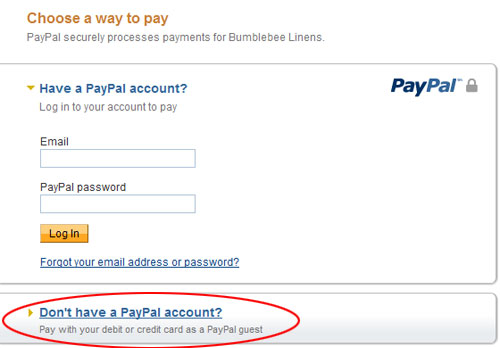
The picture above shows what a customer sees when they checkout using Paypal Standard. As you can tell, it’s not obvious how to pay by credit card.
You have to click on the “Don’t have a PayPal account” button in order to be directed to a form where you can enter your credit card info. Overall, I guarantee that you’ll shed many potential customers this way.
As a result, Paypal Standard is not a good credit card solution for an ecommerce store.
The only advantage is that it’s free.
Paypal Checkout

Paypal Checkout is also completely free of charge and allows a customer to pay by credit card and Paypal. In fact, it is more or less identical to Paypal Standard except for one very important feature.
Paypal Checkout allows you to import a customer’s information directly into your shopping cart so they don’t have to fill out any forms.
Here’s what the flow looks like.
A customer is presented with the option to pay by Paypal Checkout.
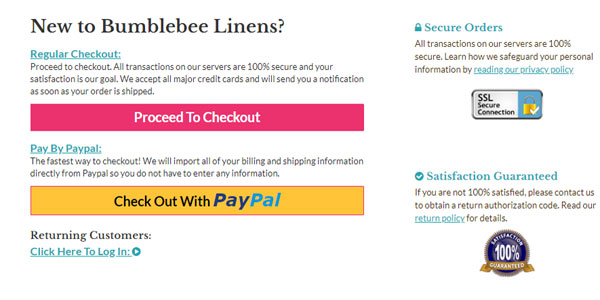
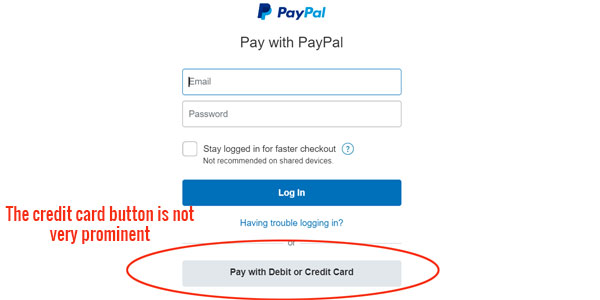
When they click on the Paypal button, they are whisked off to Paypal’s website. Just like Paypal Standard, the option to pay by credit card is not very prominent.
If a customer has a Paypal account, all of their address information on file at Paypal is magically imported into your shopping cart. They also have the option to store a cookie on their browser via Paypal One Touch so they never have to login to pay by Paypal again.
The following photo illustrates the Paypal Checkout flow on my online store after a customer logs in.
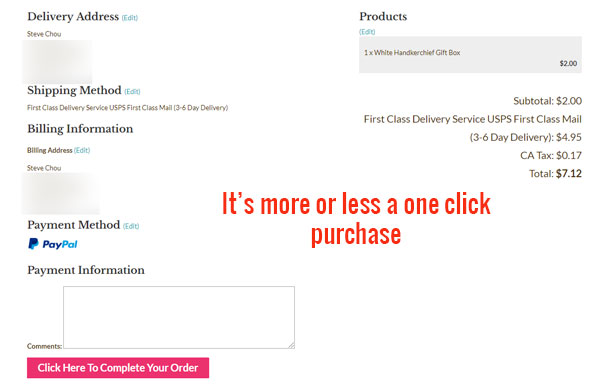
As you can see, the customer is just one click away from completing their purchase and no forms need to be filled out. In fact, this is the primary advantage of Paypal Checkout and it makes Paypal Standard obsolete.
Paypal Payments Pro

On the other end of the spectrum, Paypal also offers a high end payment product called Payments Pro. With the pro version of Paypal, you can process credit cards directly on your site.
In addition, you have access to a virtual terminal in which you can process phone orders as well. Paypal Pro costs $30 per month and offers a complete solution to all of your credit card processing needs.
However the one big drawback is that since you are accepting credit cards on your own server, you must deal with PCI compliance.
What is PCI compliance?
PCI compliance is a set of standards enacted by the credit card community to ensure that all credit card transactions are secure.
In order for your online store to be PCI compliant, you must follow a set of guidelines in order to process credit cards on your website or face fines or penalties set forth by your credit card processor.
Honestly, becoming PCI compliant is not that big of a deal but the language used in the PCI compliance documentation is a nightmare to read and go through.
In fact, it’s like reading a law document. As a result, many new entrepreneurs are often confused and scared off by the whole process.
But nonetheless, if you use Paypal Pro on your online store, the payment transaction is seamless.
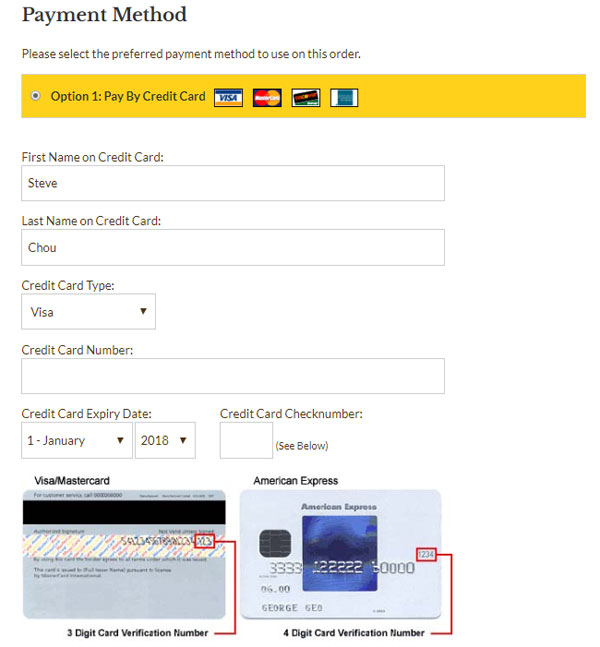
As you can see above, credit card processing is well blended with my website. To a customer, it appears as if everything is being processed natively in my shop.
Paypal Advanced

Paypal Advanced is a hybrid solution between Paypal Payments Pro and Paypal Standard/Checkout. Like Paypal Payments Pro, a customer can process their credit card payment online without leaving your website.
But unlike Paypal Payments Pro, the credit card information is not processed on your server but on Paypal’s instead. As a result with Paypal Advanced, you don’t have to worry about PCI compliance.
So how does it work? How can a customer still be on your website but not use your server to process and transmit their payment?
The answer is that Paypal Advanced uses iframes to process the payment.
If you are not technical, an iframe is basically a piece of your website that is hosted somewhere else. So when a customer is checking out from your online store, everything on your webpage will be hosted on your own website except for the credit card form fields.
Below is a screen shot of what the credit card form looks like as hosted on PayPal’s servers.
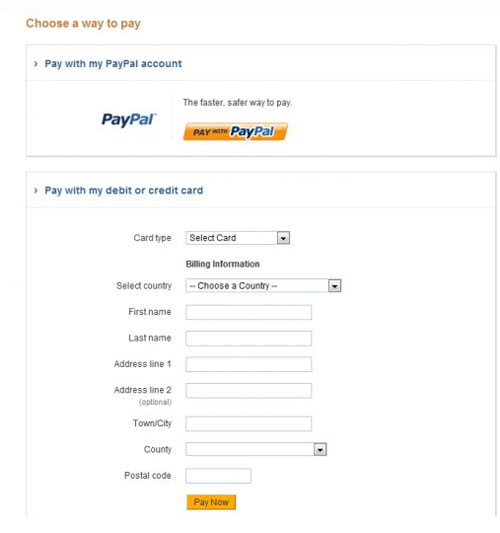
Everything you see in the box above can not be changed. However with some amount of work, you can often blend the box in with the rest of your website.
Paypal Advanced is not advertised by Paypal much at all and most people don’t know about it. But it costs just $5 per month.
Pros And Cons Of Paypal Advanced Vs Paypal Payments Pro Vs Paypal Checkout
Because a customer is taken off of your site, Paypal Checkout and Paypal Standard are not good solutions for accepting credit cards online.
As a result, your decision comes down to Paypal Pro or Paypal Advanced, both of which carry a monthly fee of $30 and $5 respectively.
But does it make sense to pay $30/month for Paypal Payments Pro when Paypal Advanced is only $5?
Here are some of the disadvantages of Paypal Advanced compared to Paypal Payments Pro.
- You can not customize the way the credit card form looks on your site. Because the credit card fields are hosted on Paypal’s servers, you pretty much have to tailor your checkout page around their credit card form to make it look good
- You do not have access to a virtual terminal – A virtual terminal allows you to process a credit card payment by hand which is useful when you take orders over the phone or when you have to conduct a special transaction
The biggest advantage of Paypal Advanced is the cost, the fact that you don’t have to worry about PCI compliance and the ability to process credit cards directly on your store without the customer having to leave your website.
Authorize.Net

Authorize.net is the traditional, old school credit card gateway solution that’s been around for decades. If you try to sign up for Authorize.net, you’ll find that there are many different vendors that will quote you wildly different rates.
In fact, it’s like shopping for insurance.
You have to find a provider that you like and then negotiate rates down based on your volume. If you are a brand new store, you’ll likely end up paying $30/month with a rate of 2.9%.
However once you achieve some decent transaction volume, you can push your rates down dramatically to a fixed rate above interchange. This transaction rate is otherwise known as Interchange Plus.
What is Interchange Plus?
The Interchange rate is the cost that your merchant account provider gets charged by VISA and MasterCard.
Interchange Plus means that your merchant account provider will pass through whatever they are getting charged by the interchange plus a markup for their services. This mark-up is charged on a per transaction basis as well as a percentage fee.
As a result, the Interchange Plus transaction rate tends to be much more steady and is in general lower than anything you can get with Paypal and Stripe.
Stripe

Stripe is probably the cheapest and easiest way to get started with your ecommerce store. It is supported by practically every ecommerce platform out there and it carries no monthly fee.
Not only that but you can often get approved in a matter minutes and start processing credit cards immediately!
The major downside to Stripe is that their rates are pretty much non-negotiable until you can consistently process at least $80K/month.
And even once you do achieve those levels, the negotiated rates are often on the order of 2.3% which is still higher than what you can get with Paypal and Authorize.net.
If You Process More Than 50K/Month – The Cheapest Solution Is…
First off, Stripe is never going to be the best deal unless you process a very low volume of $$$ per month. As a result, your best payment processing choice will be either Paypal Advanced, Paypal Pro or Authorize.net.
A typical Authorize.net merchant account and gateway will run you between 20-30 dollars a month. But the big advantage is that Authorize.net will give you a super low transaction rate.
For example, eMerchant, an Authorize.net credit card processor that I recommend, will allow you to process credit cards at a flat rate above interchange once you exceed $10k/month.
The exact rate depends on your volume but if you process over $50K/month, you can expect to pay anywhere between 2.0-2.3% on average in transaction fees for Visa and Mastercard.
The rates for accepting American Express are on the order of 2.5%. Debit cards are the lowest at around .5%.
The reason the rate is a range and not a fixed number is because different rewards cards get charged different rates on the interchange. (The exact reason why is beyond the scope of this post)
As for Paypal, your credit card processing rate at $50K/month would be a fixed 2.2% for Visa/Mastercard and 3.5% for American Express.
Let’s do some math shall we?
eMerchant charges a $30 monthly fee and let’s assume that you can get an average rate of 2.15% for Visa/Mastercard payments.
Paypal Advanced costs $5/month and the difference in monthly cost compared to eMerchant is $25.
Because the credit card processing rate differential is .05%, the breakeven point between Paypal Advanced and eMerchant is $50,000/month.
As a result, eMerchant will be cheaper than Paypal Advanced (and Paypal Pro) at volumes greater than $50,000/month.
However, there are some other factors to consider.
With Authorize.net, you have to get your server scanned on a quarterly basis for PCI compliance. Even though these scans are free, it’s still something extra that you’ll have to deal with.
If you accept a lot of American Express payments, Authorize.net will almost always be cheaper.
The same goes with Visa/Mastercard debit cards. While Paypal still charges 2.2% for a debit card, you will only pay .5% with Authorize.net.
If You Process Between 10K And 50K/Month – The Cheapest Solution Is…
At this volume Stripe is still going to be the most expensive solution since you can’t negotiate rates. As a result, your cheapest solution is either Paypal Advanced/Pro or Authorize.net.
However in the 10-50K/month processing range, the waters are a little murkier because it depends on your ability to negotiate.
Anecdotally, you can negotiate with Paypal on their credit card rates down to 2.2% as soon as you process over 10K/month.
Note: You can never negotiate with Paypal on Paypal processing rates. Only their credit card processing rates are negotiable. Unfortunately, Paypal payments are always a fixed 2.9% regardless of volume.
However with Authorize.net, it’s not as clear cut what you can get. At this volume, I’ve seen quotes from Authorize.net in the range of .4-.6% above interchange which works out to about 2.3%-2.5%.
Your mileage will vary but it implies that Paypal Advanced and Paypal Pro will be cheaper at this volume.
On the other hand, using Paypal has some major drawbacks which I outline in my article below.
Why Paypal Freezes Or Limits Accounts And How To Prevent This From Happening To You
But overall, both Paypal Advanced and Paypal Pro are great options once you process more than $10K/month.
If You Process Less Than 10K/Month – The Cheapest Solution Is…
At credit card processing volumes below 10K/month, your costs will be dominated largely by the fixed monthly processing fee. And because Stripe carries no monthly fees whatsoever, they will tend to be the cheapest.
As a result if you are a brand new ecommerce store, going with Stripe as your primary payment processor is a no brainer.
However, the waters get a little murkier once you start doing around $7500ish/month.
With Authorize.net and Paypal, you can sometimes negotiate the rates down to 2.5% after you exceed $5k in volume.
Now if you do the math, your break even point equation is simply (your monthly fee) / (2.9%-2.5%)
With Paypal Advanced, your break even point is 5/.004 = $1250
With Paypal Pro and Authorize.net (assuming a $30 monthly fee), your break even point is 30/.004 = $7500
Once again, your exact savings depends on your ability to negotiate rates down but Stripe is almost always cheaper if you process below $5/month and remains a good solution up to $10K/month.
Summing It All Up
When it comes to getting the best rate for credit card processing, it depends on your sales volume and your ability to negotiate. But whatever you do, don’t sit there idly and pay a higher rate out of laziness.
Get on the phone and demand a lower rate! After all, you can’t save money unless you ask.
In general, Stripe is the best credit card processor for new online stores because it’s 100% free with zero monthly fees.
But after a certain threshold, both Paypal Advanced, Paypal Pro and Authorize.net become much more economical solutions.
If you are doing high volumes of sales (>$50K), going with Authorize.net will almost always be your cheapest solution. But anything under that volume depends on your ability to find a good deal.
Good luck!

