
I haven’t had to deal with SSL issues for over 5 years now. When I moved my websites over to dedicated hosting several years ago, I purchased a cheap SSL 5 year certificate from GoDaddy for $10/yr and haven’t had to think about it since.
But my SSL certificate expires this year and when I logged in to renew, I was appalled to discover that GoDaddy had jacked up their SSL prices to $70/yr!!
Worse yet, all of the awesome coupons found online apply to new customers only. What a rip off!
Anyway, there’s pretty much no reason why any regular ecommerce store should fork over that kind of money for an SSL certificate. But here’s the problem…
There are so many options to choose from and there’s a lot of trickery and misinformation in the industry. So I decided to write this article to demystify the entire process. Goodbye GoDaddy! $70/yr is a rip off!
Get My Free Mini Course On How To Start A Successful Ecommerce Store
If you are interested in starting an ecommerce business, I put together a comprehensive package of resources that will help you launch your own online store from complete scratch. Be sure to grab it before you leave!
Table of Contents
The Difference Between Renewing And Buying A New Certificate
Remember when I said that all of the GoDaddy coupons found online only apply to new certificates and not for renewals?
One of their strategies to extract more money from you is to offer you a very inexpensive initial price and then jack you later when it comes time to renew.
But the key question here is…do you really have to renew versus buying a new certificate?
Here’s the difference.
With an SSL certificate renewal, the amount of time left in your existing certificate is added onto the new certificate duration.
For example if you have 4 months left on your existing cert and you purchase a 2 year renewal, then you will receive a new cert that will last 2 years and 4 months.
However if you were to buy a brand new certificate, then you would only receive a 2 year duration and lose the leftover 4 months on your existing cert.
Here’s what’s deceiving. SSL providers will lead you to believe that renewing is the only option. And often times, renewing is much more expensive than buying a brand new certificate because coupons don’t usually apply to renewals.
At least that’s how GoDaddy works. You should check, but sometimes it’s cheaper to just buy a brand new certificate and simply eat the existing time left on your old certificate.
Does Brand Matter For Your SSL Certificate?
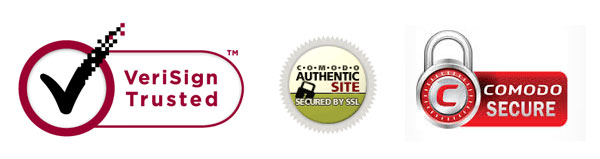
In addition to deciding whether to renew or buy a new one, there’s also the question of what brand to buy. You’ve got your Verisigns, your GeoTrusts, your GoDaddys….Is there any real difference?
The answer depends on your application.
If all you are doing is browser based ecommerce, then almost every cheap SSL certificate will do.
In other words, if your primary means of making transactions is through a web browser like Chrome, Safari, IE, Firefox etc…, you don’t need to pay for an expensive certificate.
Almost all of the cheap certs will work and are recognized across all of the popular web browsers. But you should check with your SSL vendor just to make sure.
The only time buying a “name-brand” certificate might matter is if you are doing transactions on a device that doesn’t use a popular 3rd party browser. For example, let’s say you want to make a secure transaction on a set-top box application…
Or if you want to make a secure transaction on a wearable device that uses its own proprietary software.
In these cases, you should consider a name brand SSL certificate like Verisign because it will work across more devices. But regardless, you should always check to make sure that whatever browser or app you are targeting is going to recognize your SSL certificate vendor.
Moral of the Story: 99.9% of the time, any old cheap SSL will work just fine for your ecommerce store!
What About Extended Validation Certificates?
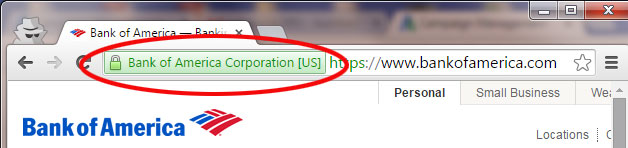
A premium EV (Extended Validation) SSL certificate is one where the issuing authority will do a much more thorough background check on your company to make sure it’s legit.
Here’s what they check.
- They check your legal identity and verify that you are the website owner
- They check that you are in fact the domain name owner and that you have exclusive control over the domain name
- They confirm the identity and authority of anyone (if applicable) acting for the website owner, and that documents are signed by an authorized officer.
As a result, you won’t get an EV SSL certificate overnight. Often times, it will take several days or weeks.
Now why would you ever get one of these EV certificates?
For one thing, some browsers will detect an EV certificate and make the entire address bar green to further ensure that the connection is secure.
This in theory is supposed to increase your conversion rate… Personally, I’ve never heard of anyone getting higher conversion rates from an EV cert but I’d do some testing on your site just to make sure.
The only reason I would consider purchasing an EV certificate is if I were running a financial institution or one where absolute trust is crucial.
Often times, these more expensive certificates offer extended insurance in case there’s an SSL breach due to the certificate authority getting hacked (I don’t know if anyone has ever redeemed this insurance however:)).
Where Do I Get My SSL Certificates
As you can probably tell from the beginning of the post, I ditched GoDaddy right away. For a regular old ecommerce store, there’s no reason that you should be paying more than $20/yr for an SSL cert.
In fact, I would even go as far as to say that you shouldn’t be paying more than $10/yr.
I get all of my SSL certificates now at a company called NameCheap.com. They offer a wide variety of certs but usually I just go with the $10 variety.
In terms of differentiating SSL certificates from the cheap options, here are the main differences that I’ve noticed.
- The cheapest of the cheap certificates won’t provide you with a trust seal to put on your site. While your connection is secure, you have to find your own graphic to display on your site
- A mid grade cheap certificate will have a static trust seal that you can use on your site. This is essentially just a canned jpg file.
- The best of the cheap certificates will offer a dynamic seal, which when clicked will take the user to a webpage that shows that the certificate is legit
Personally, I don’t think any of this really matters. As long as you are displaying trust seals during checkout, it doesn’t really matter whether it needs to be dynamic or not.
As long as the user sees a “secure logo” and the padlock on their browser, it’s good enough.
Click here to buy a perfectly good SSL certificate at a very low price
What Is SSL?
SSL stands for secure sockets layer and is responsible for encrypting and providing secure communications on the internet.
Many people have the misconception that the information encrypted by SSL remains encrypted even after its been fully transmitted to the website. SSL only encrypts the data during transmission only!
What this means is that the website accepting these secure communications is responsible for safeguarding this information because its wide open after it’s been transmitted. For example, if a customer sends me their credit card information, its only encrypted on the way to my website.
Once that information reaches me, I’m fully responsible for safe guarding the data. In general, I do not ever store credit card numbers in my data base at all because its too much responsibility to bear if someone ever hacks into my website.
Make sure you have a static IP address
You will not be able to install an SSL certificate unless you have a static ip address for your website. Usually static IPs can be purchased from your webhost for a couple extra bucks a month.
Purchasing your SSL Certificate
Before you purchase your SSL cert, you need to make a decision on which URL you will use to conduct secure transactions. Are you going to use
http://yourstore.com
or
http://www.yourstore.com.
It is extremely important to register your certificate exactly with the URL you plan on using otherwise your certificate will not work.
You will also need to contact your webhost and generate a CSR(certificate signing request). The CSR will look like a bunch of random letters and numbers, but you will need to provide this information to the place where you are purchasing the SSL cert.
Installing your SSL Certificate
Once you’ve purchased and obtained the SSL certificate, you need to contact your host once again and have them physically install the certificate on the server itself.
Once the certificate is installed successfully, you should be able to access your webpages securely when the https:// prefix is appended to your url.
For example, typing in
https://yourstore.com
should cause a padlock to come up next to your URL.
If you need help installing your SSL certification, I put together a short video below.
Troubleshooting
Sometimes even though your SSL certificate has been installed properly, you may still see a padlock with a slash through it. This means that there are probably certain elements on your page that are insecure.
- Are all of the graphics on the page stored on your domain? If you are hotlinking images from another website, you’ll need to make sure that the webpage you are grabbing them from are secure.
- Are you using 3rd party javascript code? Contact your 3rd party tool vendors for secure versions of their code.
If you still can’t figure out why your site is not fully secure, go WhyNoPadlock.com and it will tell you why. Good luck!
[yasr_visitor_votes size=”small”]