

The ecommerce platform that you choose for your online store is an important decision you need to make early on. If you choose a platform that is too simplistic, it will hurt you later on down the line as your store grows and requires more features.
 If you choose a setup that is too complicated or requires more technical knowledge than you possess, you risk delaying the launch of your shop and losing momentum.
Bottom line, you need to choose wisely because website migration is extremely complicated and fraught with risk.
As part of my free 6 day mini course on how to start a niche online store, I recommend 2 different website platforms depending on your level of technical competence.
If your primary goal is to get up and running as quickly as possible, then you should go with a fully hosted platform like Shopify.
If you want full control over your website and access to the source code, then go with an open source shopping cart like Open Cart
Get My Free Mini Course On How To Start A Successful Ecommerce Store
If you are interested in starting an ecommerce business, I put together a comprehensive package of resources that will help you launch your own online store from complete scratch. Be sure to grab it before you leave!
Table of Contents
Some Confusion Among Readers
Recently, I’ve been getting questions from readers who want the best of both worlds, the simplicity of a fully hosted platform coupled with the flexibility of an open source cart.
Steve, why can’t I start out with a fully hosted platform to get up and running quickly and then migrate to an open source platform once I need the control and flexibility?
The reason this proposal isn’t feasible from a practical standpoint is because once you launch your online store, it’s extremely hard to migrate shopping cart platforms especially if you don’t know what you are doing.
And if you are not careful, you could royally screw up your rankings and SEO visibility like this particular online store I wrote about long ago.
In any case, if you do ever decide to migrate platforms, here’s a little writeup I put together on what it would entail. You be the judge.
Gather A List Of All Of Your Urls
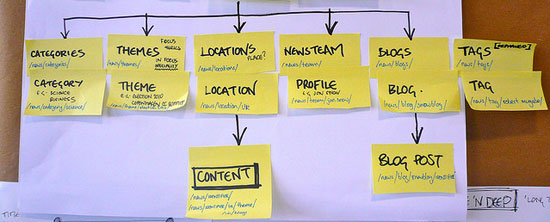
If I were migrating my shop to a different platform today, the first thing that I would do would be to write a little program to crawl every single URL on my site.
Why is this required? In an ideal world, you want the urls from your old platform to exactly match that of your new shopping cart for a seamless transition.
For example, if one of my products lives at the following address:
http://bumblebeelinens.com/bride-groom-wedding-handkerchief-with-scalloped-crochet-p-126.html
I would want the exact same product to have the exact same address in my new shop.
Note: Some platforms allow you to easily rewrite the url to whatever you want. But others do not. For example, if I were migrating my cart from Open Cart to OSCommerce as an example, it would be a major pain in the butt because OSCommerce does not allow fine grained control over the url.
The same principle applies to all of your category pages, subcategory pages, review pages etc… You should try and match up all of the urls exactly for a smooth transition.
Issue 301 Redirects

Sometimes, it’s not possible to match up the urls from your old shopping cart verbatim. Especially if you are migrating to a fully hosted platform, sometimes your addresses are hard wired and can not be changed.
In these cases, you will need a way to issue 301 redirects from your new shopping cart.
Note: There are different ways to do this depending on the platform. If you are migrating to an open source platform, you will need to edit your .htaccess file with something like the following.
redirect 301 /oldfile.html http://yourdomain.com/newpage.html
If you are migrating to a fully hosted platform, you will have to ask your fully hosted provider how to issue redirects from your old store’s urls.
The downside to all of this is that 301 redirected urls never carry over the full link juice of the original link. As a result, your redirected url will likely lose some of the SEO rankings it has already established.
Sometimes the reduction is temporary. Sometimes your rankings can recover. But no matter what, it will take time for things to settle down in the search results.
Manually Go Through Every Page
Most shopping cart platforms have automated scripts that allow you to migrate your products quickly and easily. For example, Big Commerce and Shopify will voluntarily offer to migrate the products from your old store for free. But you need to be careful.
Here’s an email I received the other day from a well known fully hosted platform
We have not spoken before but I was just on your site and noticed your store is running on osCommerce.
I work for SuperDuperAwesomeCart (an osCommerce competitor) and we are a happy home for many stores like yours who have outgrown osCommerce.If you have 15 minutes free today I would like to have a quick phone chat with you and see if we can make a migration from osCommerce to SuperDuperAwesomeCart a serious consideration for you.
Now I know for a fact that my shopping cart would not “easily” migrate over to SuperDuperAwesomeCart. With all of the modifications that I’ve made and the special product fields, there’s no chance in hell the process would be smooth.
As you run your online store, you will make small tweaks here and there over time and then forget about them. It’s these little things that will prevent a migration from going smoothly.
As a result, if you decide to migrate, you will have to go over each and every page on your site with a fine tooth comb. This is fine for small shops. But imagine if you had thousands of products. It would be a nightmare.
In addition, if you use special javascript on your pages like I do for my shop, these scripts will likely not migrate nicely either.
What Happens If You Screw Up?
In the worse case scenario, a migration mistake can cause you to lose all of your search engine rankings. In fact, one of my competitors decided to migrate platforms incorrectly and disappeared practically overnight.
In a more realistic scenario, you’ll probably have a few broken links here and there. If you have to issue 301 redirects in some places, you’ll likely lose some link juice and rankings.
But regardless, you should never treat a platform migration as a trivial task. Hell, I go into full neurotic mode whenever I add a small feature to my online store. I can’t imagine how crazy I would get if I had to move my entire platform.
So what’s the moral of the story? When you are choosing your shopping cart platform, choose wisely because it’s a pain to switch. And if someone tells you that the migration is going to be seamless?
Don’t trust them. They are just trying to get your business:) Incidentally, there are companies that specialize in platform migration. If you absolutely feel the need to change, then I would consider using a service.

