

A question I get asked all the time is how do you know when you need to upgrade webhosts for your online store or blog?
After all, my original cheap shared hosting, Bluehost, served me well for over two years until I switched over all of my sites to dedicated hosting at Storm On Demand.
In fact, here’s a question I received this past week.
Steve, Bluehost seems to offer unlimited domain hosting, unlimited storage and unlimited bandwidth. Why would you ever need to upgrade hosts if everything is unlimited? Am I missing something here?
Absolutely! There is much more to it and I’ll try and explain to you the nuances between the different flavors of hosting below.
If It Sounds Too Good To Be True, Then It Probably Is
Web hosting is a cut throat business. As a result, most webhosts will do whatever they can to entice you to sign up. So they’ll offer you unlimited accounts. They’ll offer you unlimited bandwidth and unlimited storage. But realistically, there is no way you are ever going to be able to take advantage of unlimited anything!
First off, let’s address the unlimited storage. A long time ago, I signed up for a cheap webhost(not Bluehost) and decided to use the “unlimited storage” as a place to backup all of my family photos. And at one point I had probably over 400GB worth of files on my shared account.
Everything was fine and good until one day out of the blue my shared webhost came knocking on my door.
Dear Steve, we have detected that your account contains a large quantity of unused files. Please delete the unused files from your directory or they will be purged in the next 2 weeks
When I called to complain that it was false advertising to claim “unlimited storage”, the webhost replied that all web storage must pertain to your website and/or web account and that all of my large full resolution photos did not apply.
Bottom line, I had to remove most of my photos from my account.
There’s No Such Thing As Unlimited Bandwidth
The other exaggerated claim that many shared webhosts like to make is that you are allowed unlimited bandwidth with your account. But what they don’t tell you in the fine print is that your account is only allowed a certain amount of CPU time.
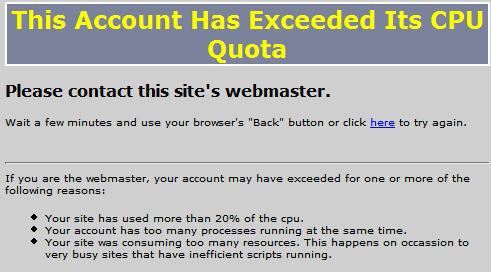
So in the event that your website is getting too much traffic and uses too much of your server’s processor cycles, your website will either get throttled or shutdown altogether. As a result, there is no way in hell that you’ll ever be able to utilize your “unlimited bandwidth” even if you are getting a ton of traffic to your site.
The amount of CPU time that you actually receive is heavily dependent on your shared webhost and is usually something I ask about whenever I signup. And in my experience, they way webhosts deal with overages is all over the map. I’ve used shared webhosts that will completely shut your website down indefinitely when you exceed your quota until you contact them directly.
Other hosts like Bluehost will simply throttle your site for several minutes or so.
Shared Hosting Is Still A Great Value
Don’t get me wrong though. Shared hosting is an incredible value for what you pay for. And the webhost that I recommend, Bluehost, is still an excellent option that costs only $4.95 a month. Personally, I would not go any cheaper than this because there will be hidden tradeoffs that you will not know about until your website starts going down.
The reason that I like Bluehost is because they don’t stuff a ridiculous number of sites on every box. They have great uptimes, reasonable CPU limits and they offer “Simple Scripts” which allow you to quickly install popular website applications onto your server.
But at some point in time as you start getting more and more traffic, you will eventually need a more powerful and a more stable computer server to work with.
When Do You Need To Upgrade?
The main downside to shared hosting is that there are a bunch of other websites running on your same server. As a result, your website can slowdown when other sites on your same box are using too many resources.
Now even though good shared hosts like Bluehost will throttle these rogue sites down, often times your website will still slow down regardless.
In the world of eCommerce, any slowdown can have extremely negative effects on sales conversions so it pays to offer your customers a consistently fast experience. If you constantly feel as though your website is sluggish and you feel like you are losing sales because of it, then it’s usually time to upgrade your hosting.
The other more obvious way to tell that you need more powerful hosting is when you constantly trip the CPU limit that your shared webhost places on your account. This was the case with my online store. Back when my online store was on shared hosting, I used to trip the CPU limit at least once or twice a week.
And each time I tripped the alarm, my website would be non-functional for several minutes. Now you can imagine that if a customer was trying to checkout during this time that they probably wouldn’t be coming back to complete the sale:)
Losing even a single customer can be costly to your ecommerce shop.
What Are The Alternatives?
Once you’ve graduated from shared hosting, the next logical step is to rent your own server. From here, there are 2 basic options. You can signup for a Virtual Private Server (VPS) or get your own dedicated server.
Here’s the difference between the two. With a dedicated host, you own the entire computer and you will be the only one using 100% of the resources. With a VPS, a server is split up into separate machines that all behave like a dedicated server.
For example, the VPS provider that I currently use, Storm On Demand, partitions a single machine into many virtual servers and guarantees you a certain amount of resources.
And the best part is that my account is more or less completely isolated from the other virtual servers on my machine so that there’s very little chance of my sites being affected by others on the same box.
The advantage of going with a VPS over a dedicated server is price. Often times, a dedicated server starts at $200/month whereas you can usually find a decent VPS for $35/month. A VPS is usually the next logical step for most webmasters after shared hosting.
Do The Math
Ultimately, the decision to upgrade your hosting comes down to money. How much money are you going to lose if your site becomes sluggish or goes down? In the case of my online store, one customer lost was enough to pay for a whole months worth of VPS hosting so it was a no brainer.
In the end, you need to gauge whether paying the extra money will end up being a net positive for your business. But honestly, given how cheap VPS hosting is these days, you would have to be making extremely little with your site to not justify an upgrade.
After all, all it takes is one major outage and you’ll wish that your site was hosted on a more solid foundation.
For more information on how to shop for a VPS, check out my post on How To Choose The Best VPS Hosting – Virtuozzo Or OpenVZ Vs Xen Vs KVM

