

A lot of online business owners focus so much on getting traffic from the search engines and optimizing for Google that they completely neglect the search bar for their own website!. And more often than not, the default on site search engine will return “no results found” unless an exact match is made.
After running our online store for many years now, I’ve found that many customers who visit our store don’t browse the categories to find the item they want to buy.
Instead, they jump straight to the search toolbar and look for exactly what they want.
And guess what happens if they yield the big donut from the search results? Over 95% leave the store immediately.
This is especially true on mobile where the browsing experience tends to be slower than desktop which is why it’s so important to learn how to build a good search engine for your shop!
As an example, check out this heat map for mobile users for my online store.
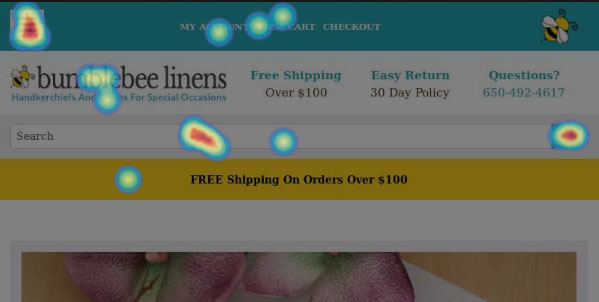
The frustrating thing is that it doesn’t matter if they can’t spell. It doesn’t matter if they enter in an incorrect search query. One bad search and a customer will leave. Period.
The reality is that most out of the box search functions for ecommerce shopping carts suck.
Here are a few examples of real search queries that I caught recently for our store that didn’t return any results with our on site search.
1. hankercheif
2. mankerchief
3. handkie
4. women’s hankies
In search 1 and 3 above, the customer clearly can not spell. In search, number 2, the customer erroneously assumes that a search for mankerchief is going to return a list of mens handkerchiefs.
Finally, search number 4 uses an apostrophe which should have been stripped out of the search string.
Unfortunately, none of these searches resulted in any matching products even though we carry all of these items in our store.
As you may have concluded, most ecommerce platforms don’t handle misspellings and synonyms so unless you do something about your on site search functions, you could be losing a ton of customers without even realizing it.
Always Log All Of Your Searches
The first step to improving the search engine for your own site is to realize that you’ll never be able to think of everything that a customer will search for.
Trust me on this. I used to think that I had every single permutation of misspellings etc… already accounted for, but someone out there will find a way to type in a search query incorrectly.
By logging all of the searches performed on your site into a database, you can get a high level view of the search queries for your products and make adjustments accordingly.
Specifically, here’s what you should look for.
- Misspellings – People can’t spell. It’s a fact
- Synonyms – Your product descriptions aren’t going to be enough. Chances are there’s another word for what you are selling and someone out there is going to search for it.
- Contractions – People will use all kinds of slang and abbreviations when doing their search and you need to account for it.
- Plurals, Apostrophes – Plurals and punctuation marks need to be stripped properly from the search strings in order to increase the chances of a match
Get My Free Mini Course On How To Start A Successful Ecommerce Store
If you are interested in starting an ecommerce business, I put together a comprehensive package of resources that will help you launch your own online store from complete scratch. Be sure to grab it before you leave!
How To Log Your Onsite Searches Using Google Analytics
So how do you log the searches being performed on your site?
Most fully hosted shopping carts can do this for you but you can just as easily use Google Analytics to achieve the exact same functionality.
Here’s a step by step guide on how to track your on site searches.
First off, login to your Google Analytics account and go to admin->settings
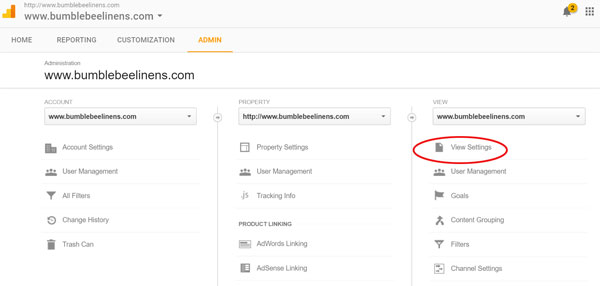
Scroll down until you see the site search settings as shown below.
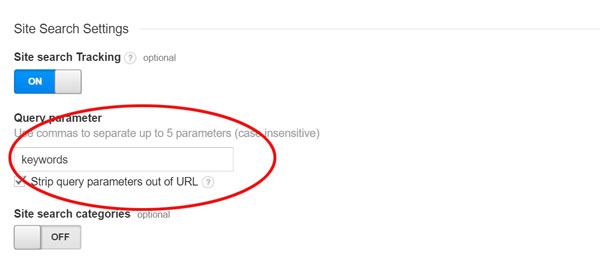
In the circled box above, you need to put the right search query keyword key that your specific shopping cart uses.
To find out this “key”, perform a search on your online store and take a close look at the URL.
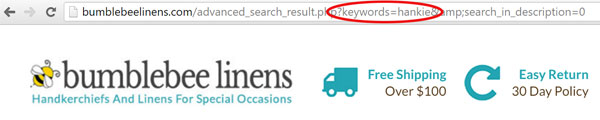
For example, my shopping cart uses “keywords” to denote the search query so that’s what I have entered in “query parameter” field in Google Analytics.
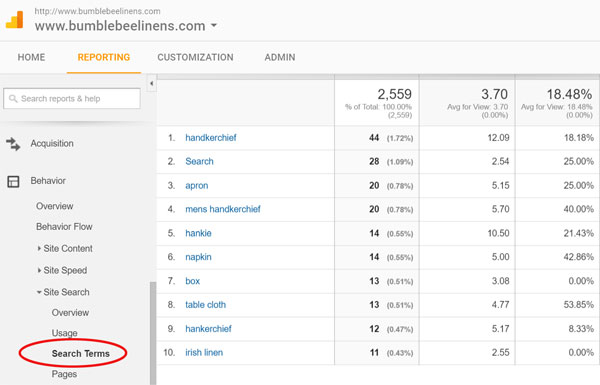
Once you have everything setup, you can then go into Google Analytics and see what everyone is searching for as shown below.
Add Keywords To Your Products Specifically For Search
Once you’ve compiled a list of keywords by analyzing real customer searches, you need to add these keywords to each and every one of your products that apply.
Most shopping carts will have a search field in which you can insert extra search terms.
As an example for our store, we want the term “Mother of the Bride” to match a large number of products that don’t have the term “Mother of the Bride” in either the title or the item description.
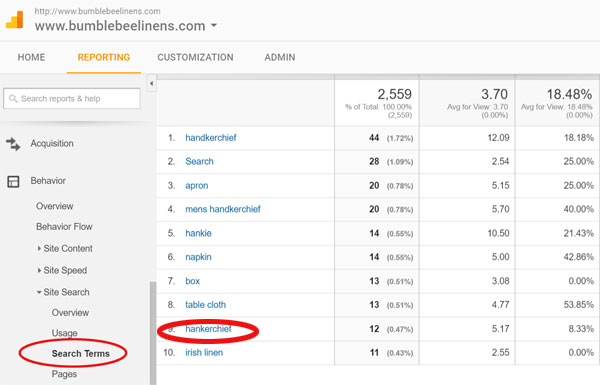
In my store’s search results above, you can see that a lot of people search for “hankerchiefs” which is a common misspelling of our main product. We definitely want to add this term to our listings.
Adding search terms to each individual product can be extremely tedious if you have a lot of products which is why it’s important to add these terms as you add products to your store.
In fact, you should make adding new search terms for your products part of your routine otherwise it will take too long to do mass updates.
Most people who throw up a store focus on the item descriptions but the search keywords are arguably more important.
Make It Easy For Customers To Refine Their Search
Sometimes you’ll discover a new keyword only to find that hundreds or even thousands of products need to be updated.
Another way to improve your search is allow customers to easily refine their search queries.
Using our own store as an example, let’s say someone searches for the term “hankies”.
Over 50% of the products we sell are labeled as “handkerchiefs” not “hankies” so out of the box, the term “hankies” would not match any items.
Now let’s say that my wife and I were too lazy to go and update the hundreds of products that we carry to add the search term hankies (unrealistic I know….).
Instead of adding “hankies” to hundreds of products, we can pull a trick out of Google’s hat.
Instead of displaying “no products found”, you could instead display a brand new search link that says something like.
Did you mean to search for “handkerchiefs”?
If you make this link prominent enough, I’ve found that customers will click on the new search link if they get the big donut.
Here’s what it looks like on our site.
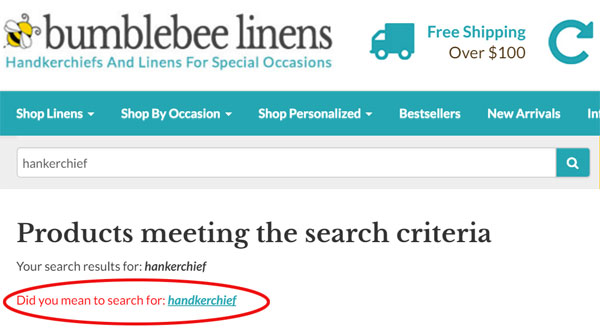
This technique is just an easier way to improve search for new keywords without having to update your entire product database.
Watch Out For Plurals,Punctuation Marks and Contractions
As a general rule, you should remove punctuation marks and account for plurals once your customer hits the search button.
The idea here is to strip out any random characters that will never match your products and to maintain a consistent set of search characters.
All open source shopping carts will allow you to tweak the search algorithms to cater to your own products but if you decide to go with a fully hosted solution, you might want to ask how they deal with certain search queries.
Do they strip dashes, apostrophes, plurals? Can you create search suggestions?
I know for a fact that both Shopify and Big Commerce have plugins that can greatly enhance the search in your shop. So be sure to ask!
Don’t Neglect Onsite Search!
Whereas most of our customers find our products through Google and land directly on the product or product category they are searching for, there is a good percentage of customers that still use our on site search.
And it would be stupid for you to inadvertently drive these customers away because your search sucks.
But don’t get me wrong.
You don’t need to create the next Google for your online store, but it’s fairly easy to create a decent search engine for a small set of specific products.

