
Twice a year, I publish an income report to track the progress of my various online businesses.
And in case you are new here, my primary sources of income are my online store at BumblebeeLinens.com and my blog at MyWifeQuitHerJob.com.
In addition, I run a small business podcast and an ecommerce conference called the Sellers Summit. Feel free to check them out!
On this page, I post the most up to date income reports for my businesses which usually come out in January and July of every year.
Note: As of 2019, I have stopped publishing income reports with full revenue numbers. Not only was it making my wife uncomfortable but it got to the point where they sounded presumptuous and no longer added value to the blog.
Instead, I now publish year end reviews for both of my 7 figure businesses which outline the changes and updated strategies for the year.
As of right now, the latest year end report for my online store(Bumblebee Linens) can be found here.
And a link to the latest year end report for my blog can be found here.
If you want to learn how to start your own profitable online store, click here to sign up for my free 6 day mini course.
Get My Free Mini Course On How To Start A Successful Ecommerce Store
If you are interested in starting an ecommerce business, I put together a comprehensive package of resources that will help you launch your own online store from complete scratch. Be sure to grab it before you leave!
Table of Contents
Which Business Model Is Better? Blogging Or Ecommerce?
Because I’ve had a good amount of success with selling physical products online and blogging, I often get asked which business model is the best one to pursue. In fact, here’s an email I received the other day from a reader of the blog.
Hey Steve, I’m thinking about starting an online store or a blog very soon and I’m thrilled I found you. I know that you’ve done both so I wanted to know which business model you recommend for someone just starting out.
Thank you for sharing your wealth of knowledge! -Kay
First off, the answer to this question is fairly complicated and largely depends on your personality and your long term goals.
But by reading about my experiences with both business models below, you should be able to decide for yourself.
Let’s start with blogging first.
How Much Do I Make Blogging?

Before I delve into the numbers, I just want to say that I’ve always been a little embarrassed by how long it took me to make meaningful money with MyWifeQuitHerJob.com.
In fact, a bunch of my other blogging buddies started around the same time as I did and many of them are either making more money than I am or have a larger reader base than I do.
As of today, I’ve been blogging for almost 7 10 years. And to tell you the truth, I’ve probably put more hours into writing articles for MyWifeQuitHerJob.com than I have spent working on my online store.
Writing also doesn’t come that quickly or that easily for me. And to make things worse, no one was reading my blog during the first 2 years.
Even my Mom used to tell me…
Why would people possibly want to read your posts and pay you money?
The Tipping Point

But after about 2 years of blogging to a really small audience, something magical happened during year 3.
My blog started to generate some serious traction. And low and behold, I started gaining traffic and regular readers on an exponential growth scale.
In 2012, I broke 6 figures for the first time.
In 2013, I made $171,000.
In 2014, I broke $350,000.
And in 2015, I hit $712,000.
And in 2016, I hit $1,000,000.
And in 2017, I hit $1,400,000.
As mentioned earlier, 2017 was the last income report that I published and I probably won’t put out anymore until I hit another major milestone.
Click here to read the last income report I wrote up for MyWifeQuitHerJob.com.
After years and years of slogging away at the keyboard for no money, I’m ecstatic to finally enjoy the fruits of my labor.
But folks, if you are trying to make money fast, then blogging is not the answer.
You can easily make much more money with an online store in a much shorter period of time than you can with blogging.
For example, my wife and I made over $100,000 in profit in our first year of business with our online store.
But with my blog in the first year, I maybe made $100 but that’s probably pushing it.
Editor’s Note: If I started my blog all over again from the beginning knowing what I know now, I could probably start making 4 figures/month within a year
The Intangible Benefits Of Blogging

But money aside, blogging is an incredible way to express yourself and to build an audience.
First and foremost, a blog allows you to create a loyal following. Simply knowing that someone is out there reading my stuff is quite satisfying and makes me happy every time I hit the publish button. (Take that Mom!)
I’ve also met a ton of new people through blogging that I would not have met otherwise. And many of these people I now proudly call my friends.
By writing and podcasting about ecommerce, I’ve also inadvertently positioned myself as an authority in the ecommerce space. As a result, I’ve been offered a few book deals (including an offer from Wiley Publishing).
I’m also constantly bombarded with free products and free software to review. And I even launched a successful ecommerce course that now has ~3000 students!
There’s no way that would have happened without my blog.
Most importantly, I feel like I’m making a difference in this world by teaching others how to start their own businesses. This last point is crucial.
It’s hard to describe the feeling but helping others take charge of their lives is probably the most satisfying part of blogging.
Blogging Vs Ecommerce

If you’re like my Mom, you’re probably wondering how a blog can possibly make money.
With MyWifeQuitHerJob.com, I generate income primarily through advertising, affiliate marketing, podcast sponsorships and online course sales. And the best part is that these income sources are passive in nature.
But as I mentioned earlier, it takes a tremendous amount of time and effort before you can make even a single penny.
If you decide to start a blog for the sole purpose of making money, don’t expect to make any meaningful revenue for at least a few years because you need to build an audience first.
If your goal is to make money immediately, then go into ecommerce and start selling something online.
Starting an ecommerce store will almost always make money faster than a blog because you don’t need that much traffic to sell your own goods and the payout per sale is often much higher.
But the beauty of blogging is that once you start getting some momentum, your growth potential is limitless and the margins are incredible!
Last year, my ecommerce store generated more revenue than my blog, but my blog was more profitable.
Why? It’s because the money I made from blogging was more or less pure profit.
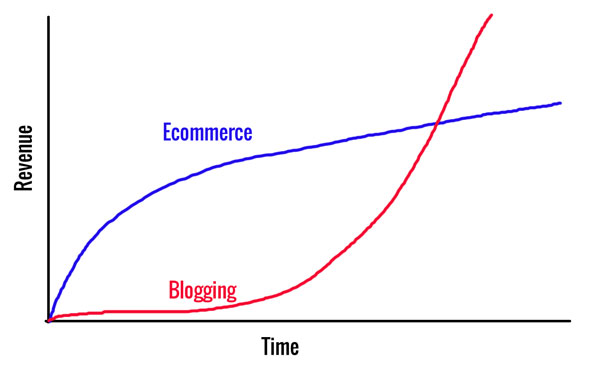
Unlike running an ecommerce store, I don’t have additional overhead in the form of inventory and office space. And even though my ecommerce store made a lot more money during its first 5 years of existence, my blog is growing much faster today.
To put things in perspective, here’s a graph I threw together that demonstrates the growth curves of both business models.
So What’s The Verdict? Should I Start A Blog Or An Online Store?
If you have less than $500 to start a business or if you don’t know what business you want to start, I would advise that you start a blog and put yourself out there.
The starting costs are super low ($3.95/month) and by building an audience now, you will have a place to market your products to when you are ready to start selling.
Remember, blogging is an excellent way to get your ideas out to the masses, to establish yourself as an authority and to reach out to other experts around you.
What’s really nice about MyWifeQuitHerJob.com is that the majority of the money I earn is passive income.
Unlike my ecommerce store, I don’t have to worry about carrying inventory, customer support, customer acquisition, importing goods from overseas etc..
The real question that you have to ask yourself is whether you have the patience to get through the initial slow period of blogging or whether you want to start making money right away.
If you want to make money faster, then sign up for my FREE 6 day mini course on how to start your own profitable online store.
If you prefer generating more passive income, continue reading and I’ll show you how to get started blogging right now in under 5 minutes for less than $4/month.
How To Start A Blog
First off, if you are interested in ever making money off your blog or turning it into a business, then you must host it yourself and own your domain and website.
This is absolutely required.
Right now the best blogging platform available is WordPress. And an economical way of getting started is by hosting your WordPress blog on Bluehost.
Not only does Bluehost only cost $3.49/month, but I actually ran my ecommerce store on Bluehost for 2 years before I transitioned to dedicated hosting and I’ve had very positive experiences with them.
Blogging has been one of the best things ever to happen to me and has allowed me to quit my job. Today I work from home, travel whenever I want and attend all of my kids’ activities.
Below, I’ve written step by step instructions on how to start a WordPress blog in the easiest way possible and for the lowest possible cost using a reputable webhost.
Step 1: Sign Up For Webhosting
Instructions How To Sign Up
- Go To The Blue Host Website
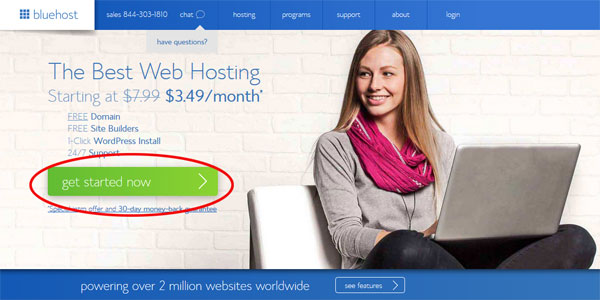
- Click On The “Get Started Now” Button.
- Select A Plan
If you’re just starting out, just go with the cheapest plan which will be fine until you reach about 1000 visits per day.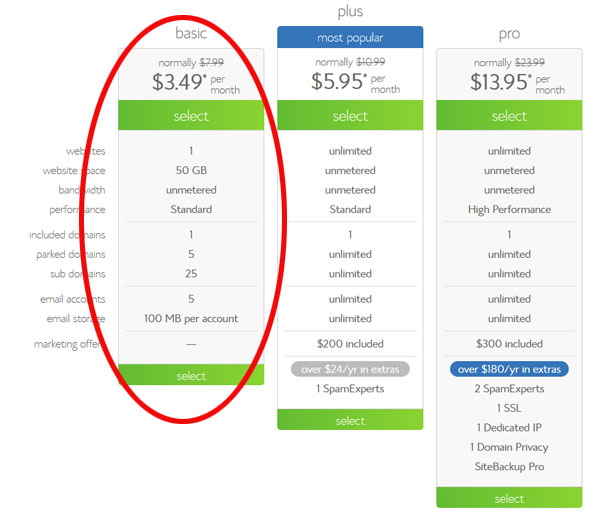
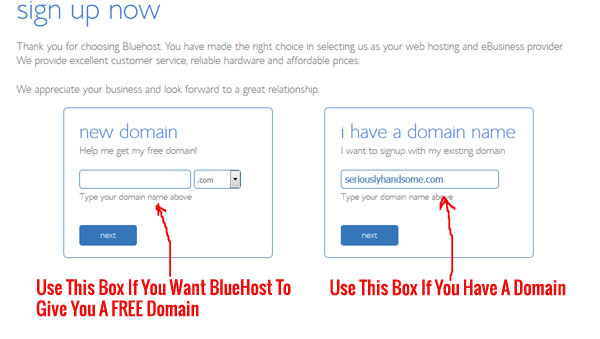
- Type In Your Domain.
Note: If you already own a domain, simply type it in.
- Enter Your Account And Billing Information.
- Choose Your Hosting Package. You will be given a choice of 12 months, 24 months or 36 months. The longer the time frame, the cheaper it will be.
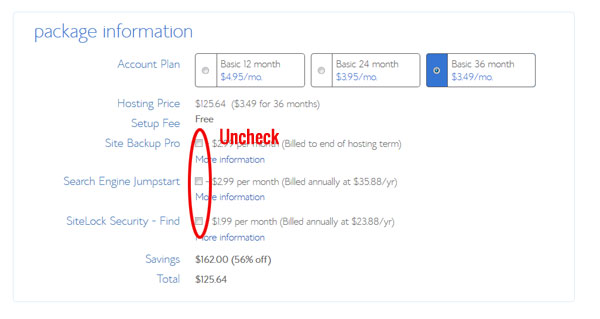
- Make sure you unclick all the stuff you don’t need. Trust me. You don’t need SiteLock Domain Security, Site Backup Pro or Search Engine Jumpstart
- Click Next. You will receive a confirmation in your email.
Step 2: Install WordPress
WordPress is by far the most popular blogging platform out there. And the best part is that you can install WordPress in a matter of just a few clicks on Blue Host
- Go Back To Your Bluehost Control Panel Front Page. If you forgot how to get to your control panel, Click Here
- Click the icon that reads “One Click Installs” under the “Website” section in your cPanel.
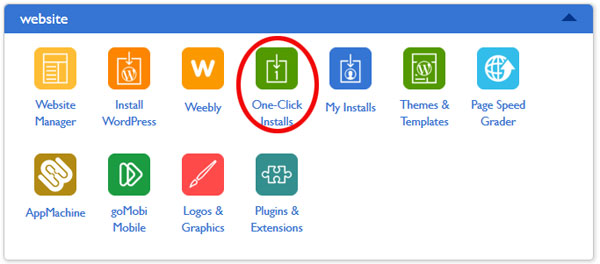
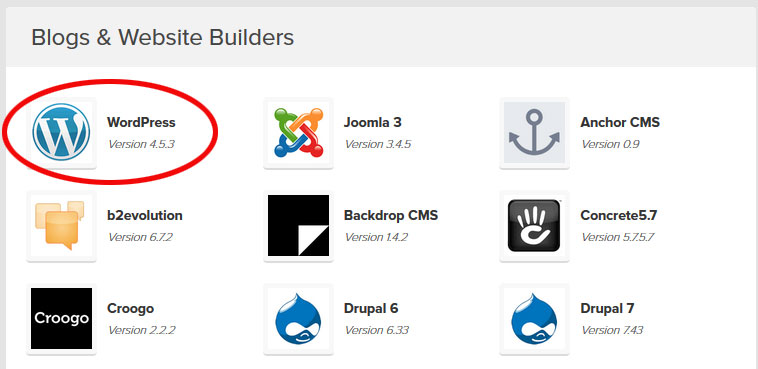
- Select WordPress To Be Installed
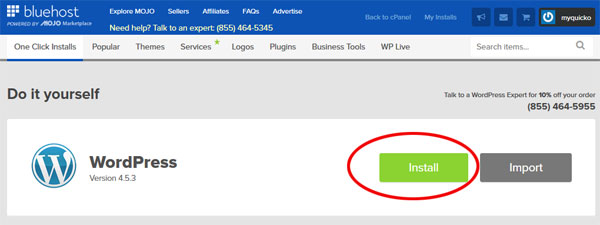
- Click on the “Install” button
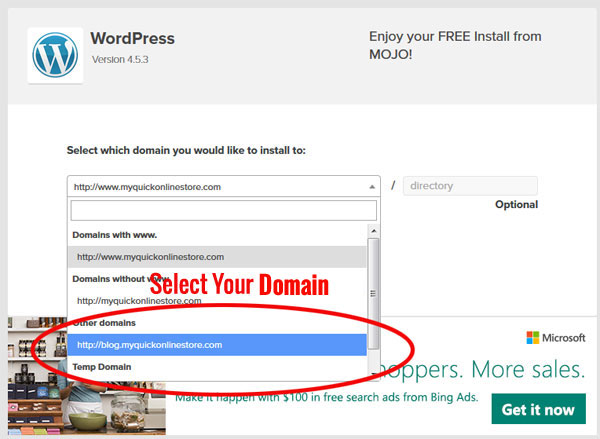
- Enter Your Domain
- Enter In Your Blog Username And Password
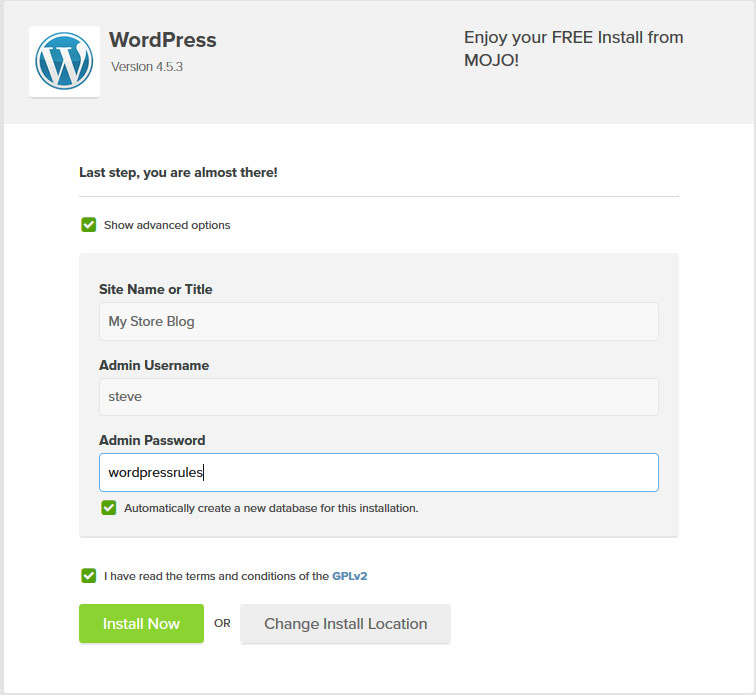
- Click “Install”. Now WordPress has been uploaded to your domain!
Navigating WordPress
To sign into your WordPress account, all you have to do is type the following url into your browser
yourdomain.com/wp-admin
Login with the username and password you selected during installation. Click “Add New Post” and begin blogging!
There Are Many Different Ways To Make Money Online
Whether you decide to build an ecommerce store or start a blog, just keep in mind that there are many different ways to make money online.
Overall, your decision should be based on how much money you are willing to invest and your time frame to profitability.
If you are interested in starting an ecommerce store, I would recommend starting with at least $500. And once again, sign up for my free 6 day mini course if you want a good overview of the process.
If you are unsure about what business you want to start or if you don’t have the funds, then start blogging and building your audience now! By creating a loyal following, you are paving the way for your future. Good luck!
photo credit: Poetry in Motion