

When you first launch your online store, you’re likely to be far more concerned with generating sales than with the logistics of actually shipping orders.
In fact I remember back in the day when I first started, I was so obsessed about getting customers in the door that I completely neglected the order fulfillment details of running my store.
What? You mean I actually have to ship product and not just collect money?
As a result, when orders started rolling in, I made a few classic mistakes that most new shop owners make. For one thing, I didn’t have a bulk shipping strategy. Instead of using a computer to print labels, I drove to the post office every day, waited in a long line and hand filled out delivery confirmation forms.
Then, I went back and manually entered in the confirmation numbers into my shopping cart backend and emailed them out to customers.
After a while, having to trek to the post office every single day started becoming a drag. It got to the point where I knew every single employee at our local post office by name and I was even aware of some of the post office gossip.
Then one day, I discovered electronic printing and I was ecstatic (This was back when it wasn’t mainstream). Imagine being able to print postage at home and not having to physically go to the post office. It was incredible!
In the beginning, my wife and I used plain pieces of paper, cut out the shipping labels with a pair of scissors and manually taped them to each and every box.
Soon after, I discovered self-adhesive shipping labels which eliminated the cutting and taping, but I was still manually entering in addressing information into the computer to print the labels.
After hitting about 5-10 orders a day, I got sick and tired of typing in address information to print shipping labels and finally decided to write some code in my shopping cart to transmit address information directly to Paypal where I was doing the shipping at the time.
Streamlining The Shipping Process
Being able to print bulk shipping labels using Paypal Multi Order Shipping managed to tie our store over for quite a while. Whenever an order came in, our shopping cart would magically send the purchase and address information to Paypal, where we used their bulk shipping manager to print out all the labels.
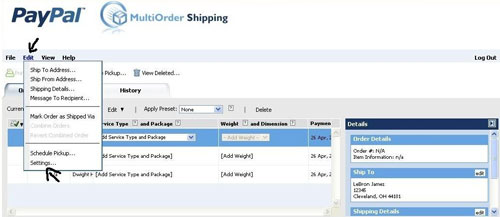
It’s a actually a pretty efficient system and most shopping carts today support this feature out of the box. And the best part is that using Paypal’s bulk shipping interface is absolutely free.
Overall if your store gets under 15 orders per day, I think shipping your packages this way is reasonably sufficient. But once order volume starts exceeding these values, things start getting tedious again and you’ll probably need to implement some new systems.
Why You Need Further Shopping Cart Integration
Having your shipping addresses sent to your shipping carrier or Paypal where you can print all of your labels in bulk is all fine and good. But there are still a few tedious steps that you’ll need to eliminate to handle higher volumes. Plus, you also need to make it easier when it comes time to do the accounting and paperwork for Uncle Sam.
First of all, even though you are sending your address information to your shipping carrier, you still have to weigh the package. In an ideal world, you could have the weight of all of your goods pre-calculated so you can send this info over to your carrier as well. But realistically, you’ll still have to use a scale.
Second of all, you still need a way to retrieve shipping cost information and tracking numbers for your own bookkeeping. For a long time, we were doing this manually by generating a CSV file of all orders and then cutting and pasting them into an accounting spreadsheet.
Doing things the right way requires your shopping cart to be able to extract information directly out of the shipping carrier’s database, regardless of whether you use Fed Ex, UPS, USPS etc…
The Holy Grail Of Bulk Shipping
Today, we have a much more streamlined shipping system with our store and it’s pretty easy to implement using 3rd party shipping software which I’ll talk about in a minute. When an order comes in…
- The order information is automatically uploaded to our 3rd party shipping software from our shopping cart
- We put the package on a scale and the scale transmits the weight to the shipping software
- The shipping label is printed with a single click of the mouse
- The shipping software then automatically marks our order as shipped within our shopping cart, sends the tracking info to the customer and updates our database with the cost of shipping
As a result, pretty much all we have to do is weigh the package and everything else is taken care of. Then at the end of the month, my shopping cart then exports a full report of all orders, revenue, shipping costs, etc… so my wife can do the books.
What Is This Magical 3rd Party Software?
The holy grail of bulk shipping I mentioned above can be easily implemented with 3rd party tools like ShippingEasy, Stamps.com and Endicia, but all of these services can be a little confusing to distinguish from each other so I will summarize them below.
First off, there are a lot of different shipping carriers in the world and the right solution depends on which ones that you use.
Note: All of the services below integrate very easily with all of the popular shopping carts out there but you should double check to see if your cart is supported. If you are using Shopify, you can also use Shopify Shipping which is free.
 If you use USPS (United States Postal Service), your choices are very limited. Only Stamps.com and Endicia offer integrated shipping solutions because USPS does not have a public API to access their shipping info. Of the 2 services, I personally recommend Endicia.com which is what we use today. They are easy to use and their support is excellent. Plus, they are pretty cheap at $15.99 a month.
 If you use UPS, FedEx or DHL, then ShippingEasy is the right solution. They offer software that allows you to streamline all of these other carriers. Plus, it’s free for up to 50 shipments per month!
But here’s where it gets confusing. On the ShippingEasy website, they also say that they handle USPS as well. But in reality, they only offer integration to outside services that support USPS like Stamps.com and Endicia.
Update: When you sign up for a ShippingEasy account, it comes with an Endicia account for free. So it’s now a no brainer to simply sign up for ShippingEasy
Conclusion
Once your store starts selling greater than 10-15 orders per day, it’s time to start streamlining your shipping. Since Stamps.com and Endicia only handle USPS, it’s a pain in the butt if you ever need to ship UPS or FedEx in addition to USPS.
So here’s what I recommend. There’s no reason not to go with ShippingEasy.com. They’ll give you a free endicia account, you can ship across all carriers from a single interface and the service is free!
In any case, dealing with bulk shipping problems is definitely a good problem to have. Happy shipping!
photo credit: -Tripp-

