

In a previous article on How Pinterest Has Increased Sales For Our Online Store Along With Some Real Numbers To Back It Up, we announced that Pinterest is now one of our top 6 referral traffic sources for our wedding linens store.
And as a result, we put together a guide on how to sell on Pinterest in order to drive high converting customers to your online business.
In reality, using Pinterest effectively is not rocket science. But as with any social media site, there are certain guidelines that you should follow to maximize your exposure.
Add Pin It Buttons On Every Page
One of the most important features that drives traffic to our products is the Pinterest “pin it” button. In fact, we have a pin it button on all of our products pages as well as on all of our content pages.
The important thing to realize is that most people don’t have the Pinterest toolbar installed on their computer. So if you don’t have the button ready to go, you could be losing out on a lot of potential pins.
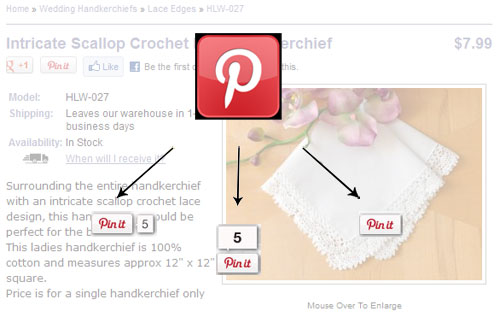
The ultimate goal is to make sharing pictures as easy as possible. Therefore, you also want to specify the exact picture that you want pinned when someone clicks on the “Pin It” button along with the name of your product and a keyword rich blurb (See example below which is auto-populated when someone clicks on the pin button).
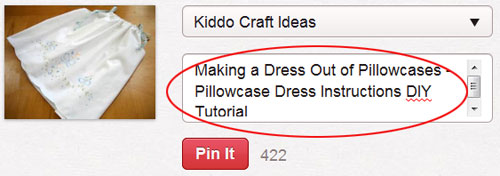
Don’t make people have to think or type!
By making it as easy and painless as possible to pin, you will generate traffic organically as other users pin and repin your pictures.
Put Yourself Out There
Since Pinterest is mainly used by women, it is necessary to convey a sense of who you are and what your business stands for. Your goal is to get as many followers as possible so you can then subtly plug your products which will then be re-shared across the entire Pinterest network.
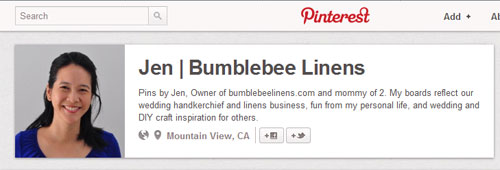
But in order to do that, you need people to buy into your personality and to your taste in pins. Therefore, it’s important to describe what your boards represent in your profile “about” section. If you are representing your business, you should also include your website URL so customers can easily find your online store.
Target Your Audience Appropriately
Instead of haphazardly pinning everything you see, be thoughtful of what you pin and the audience you are targeting. For our online store, I wanted to convey to the audience that I’m a mom and a small business owner in the wedding industry.
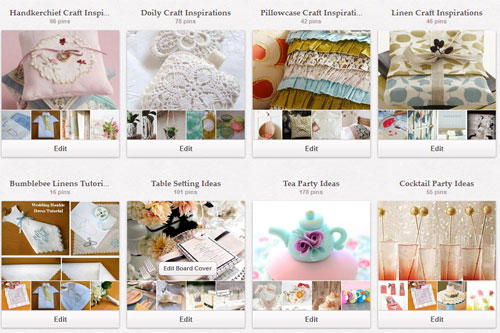
To show my parental side, I created several boards relating to children’s craft ideas and how to create great family mementos. At the same time, I targeted DIY brides and crafters by creating boards composed of projects made with our linen products.
All of these boards were created to inspire, and not necessarily to generate sales. After all, if you have good pins, you will attract more followers which in turn will share more of your pins should you decide to post your own products.
To attract brides and wedding planners, I also created several boards dedicated to wedding resources which included a wide range of bridal products that we don’t carry in our shop.
The reason you should pin products outside of what you sell is because even if a customer doesn’t purchase from you right away, they may know other brides that might.
Plus, by subtly plugging some of your own products within your boards, you can introduce new products that a customer may never have thought of buying.
Name Your Boards With The Proper Keywords
You should always name your boards in such a way that they are easily identifiable. And if you can, you should always include your targeted keywords in the title.
For example, I created the boards “Handkerchief Craft Inspiration” and “Wedding Bouquet” because those are commonly searched for terms.
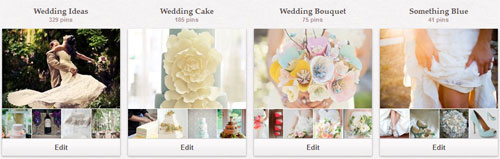
Some Pinterest experts will tell you to pick a board name that is catchy. But keep in mind that most people don’t search for “catchy phrases”. Therefore your boards are more likely to be found by keeping your names simple and to the point.
It is also important to describe each board thoroughly in the board description field because it will help index your board into the search engines.
Again, be sure to use all of your targeted keywords here and don’t forget to make your profile searchable in the search engines by turning off the “hide” field in your Pinterest settings.
Finally, be sure to rearrange your boards so that you place the most relevant boards on top and your non relevant “fun” boards towards the bottom.
Pin With A Purpose
You should always pin with a specific purpose in mind. Pick pins that are relevant to your boards using many different sources and avoid pinning from just one or two sites. Also, you should have a good mixture of direct pins vs re-pinning other people’s selections.
When you are first starting out, you should pin a variety of selections to fill out your boards. But once your boards are full, it’s more important to pin regularly versus in big spurts.
By gradually spacing our your pins, you are providing people with more time to discover your pins and to provide your boards with maximum exposure.
Never over pin your own products! In general, people are turned off by too much self promotion. A good rule of thumb is to pin 90% of other people’s stuff and 10% of your own.
Also, try to space out your self-promotional pins on your board so that they aren’t clustered together.
Pinning For Search
As I mentioned earlier, it’s always a good idea to rename or describe your pins using all of your targeted keywords. The fact is that most people don’t bother renaming their pins so your description will likely remain the same as it gets repinned all over the Pinterest world.
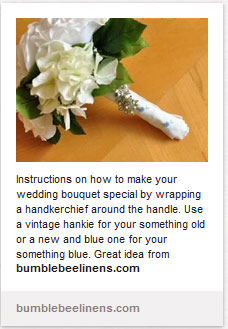 For images that you personally own, you may want to include your business website in the pin description. When you add a website address in the description, it shows up as a hyperlink.
Some new Pinterest users are not aware that clicking on the picture will take them directly to the originating pin so including your URL adds a little extra reinforcement.
Also, don’t be afraid to use calls to action within your pin descriptions. For example, when we pin our craft tutorials, we include actionable phrases such as, “Additional instructions can be found by clicking here www.bumblebeelinens.com”.
This action item might be the difference between someone just looking at your pin vs going to your website and buying something.
Should I Add Prices To My Pins?
Some shop owners choose to add a price tag to their pins. When you mark a pin with a price, the pin gets automatically categorized under the “gift” section.
The thought is that if someone is looking for a gift, they might purchase through Pinterest by searching for items in this section.
I personally never pin or repin anything with a price. I think “this selling” can turn some people off and it may limit your potential buyers. Think about it this way.
If you include a price and that price is perceived as too high, the buyer may automatically dismiss your website and not even bother looking at it.
It’s much better to be ambiguous and get the customer to visit your website where you can present a variety of goods that might meet their needs.
Go To Your Customers
 Finally and most importantly, you should always tailor your pins based on what people are looking for. Analyze what people are repinning from your website as well as from other websites in your industry.
You can easily find out what people are pinning from your website by typing in http://pinterest.com/source/yoursitehere.
Since we are in the wedding space, I regularly monitor the “wedding and events” field and tailor my future pins or products to be inline with what I see. You will want to do something similar within your own space.
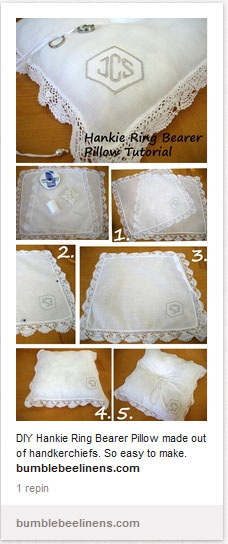
For our most popular pins from our website, we go the extra mile and create larger “infographics” of those pins. For example, one of our most popular pins relates to a pillowcase dress tutorial that we have on our website.
Since I noticed that it was constantly being pinned, I created a infographic on this craft by creating a cluster of photos detailing the steps into one larger picture.
The reason behind this is that when you arrange a group of photos together, more people are going to repin it to their boards because it’ll stand out.
A long skinny photo will stand out in a sea full of similar size pictures. And the more people repin your images, the more potential traffic you’ll get.
How To Sell On Pinterest Conclusion
I don’t proclaim to be an expert on Pinterest but I’ve noticed that these simple steps have given our store significantly more traffic.
Plus, by looking at all the beautiful pictures on the web, it has provided me with more ideas on what else to include on our website, especially in our arts and crafts section.
Remember, the more quality content you have on your website, the more it will help with your website ranking. And the more people that find your site and your pretty pictures, the more people are likely to pin your stuff. Hope these ideas inspire you with your Pinterest campaign. Best of Luck and happy pinning!

