

As many of you who follow my email newsletter are aware, I recently switched my email marketing provider from Mailchimp over to Aweber and I thought that it would be interesting to compare the two services.
For all of you who are not doing email marketing for your business, you really should consider doing so. Having an email list or newsletter is the best way to mobilize your audience to take action.
It’s also a great way to maintain an active community of readers/customers for your site. In any case, this post is not about trying to convince you to use an email marketing provider, but if you are in the market for one, this review may help you out.
What Initially Attracted Me To MailChimp
 Honestly, what attracted me initially to Mailchimp was that they offer a trial period in which their service is free for up to 2000 subscribers.
Note: There’s a major limitation on the number of emails you are allowed to send with a free MailChimp account. Also, the autoresponder feature is disabled which makes a free account much less useful..
I know, I’m cheap. I can’t help it. The Asian in me always prevails. Even though all of the top bloggers use Aweber, I opted for Mailchimp because of the free startup cost. That and my buddy Sid Savara was also using MailChimp and highly recommended the company.
Anyways, in using both email providers extensively and having learned the ins and outs of both services, I discovered the pros and cons of each which I’ll enumerate below.
Who Has The Better Form Design Tools?
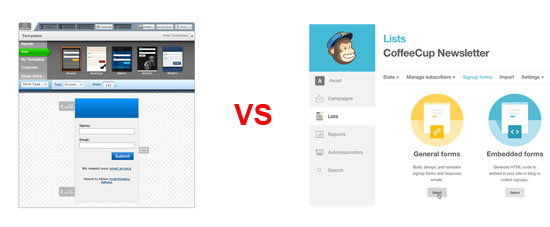
If you are a half decent web designer, you’ll definitely prefer Mailchimp over Aweber in terms of form design. MailChimp let’s you either design your forms entirely from scratch or use their GUI to design a professional looking form.
They have many templates to choose from, but if you want to do everything yourself, they also give you the raw code and you have full control over the look and feel of everything. I found that the design freedom that MailChimp provides was especially useful when designing popup forms.
Aweber on the other hand, seems to steer you towards using one of their pre-baked form templates. If you stray from their template, then you have to do a little bit of hacking to get things looking the way you want. For example, getting the popup signup form working on Aweber the exact way I wanted it to look took me several hours.
I basically had to download the javascript from their site, figure out how their code was written and then tailor it to how I wanted it. Otherwise, I would have been limited to their templates which I didn’t really like. In addition, the Aweber popup code didn’t work properly across all web browsers and I had to fix this manually. (Updated: This problem has been rectified)
Mailchimp also offers a more flexible interface with which to design HTML emails and they’ll also host the images for you. Aweber does not offer an image hosting service as far as I can tell (Updated: Aweber will now host unlimited images for you).
One annoying thing about Mailchimp that I wanted to mention is that you can have only one signup form per list. In Aweber, you can have as many forms as you want per subscriber list and you can track the performance of each one independently.
But with Mailchimp, all signup form code is the same for a given list as is the CSS. What this means is that you can’t really test different form designs and it’s kind of a pain to include multiple signup forms on the same page.
Overall however, I like MailChimp’s interface better even though their website is a bit slower than Aweber’s because of all of the graphical functionality baked into the UI.
Edge: MailChimp
Who Has Better Email Tracking?
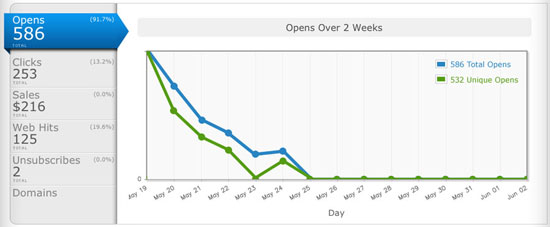
 When I first switched over from Mailchimp to Aweber, I immediately noticed how much better Aweber’s email tracking capabilities are compared to MailChimp.
With Aweber, you can tell exactly who has opened your email and exactly which links that they have clicked on and when. With Mailchimp out of the box, you don’t have any of this information. (Update: MailChimp has improved upon this such that the 2 services are now on par)
Instead, MailChimp puts stars next to each of your subscribers which provides a vague metric with which to measure the quality and interest of your readers. In addition, MailChimp does not track users who sign up for your newsletter but don’t confirm their email.
Aweber is also better when it comes to tracking clicks within an email. Whenever you use a link in an email with click tracking enabled, Aweber displays the link using the exact same URL from your domain. Mailchimp on the other hand, uses a super long and obscure link which is then redirected over to your site.
In general, readers are more hesitant to click on links with a super long and cryptic URL. With Aweber, the destination URL points straight to your domain and the click is still tracked. As a result, I’ve seen a dramatic increase in click throughs when I made the switch over to Aweber.
In addition to all of this, Aweber also provides conversion tracking if you sell products and you can also track how each reader traverses through your website from an email campaign.
One final super annoying thing about Mailchimp is that you can’t send an email to multiple lists at the same time. Therefore, if you want to send an email to more than one list, you have to replicate the email campaign and re-send each time. This can get very tedious.
Overall, Aweber is much more powerful than MailChimp when it comes to tracking users.
Edge: Aweber
Who Has Better AutoResponders?
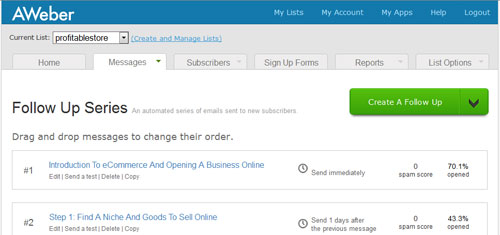
Both MailChimp and Aweber offer an easy way to set up a series of follow up emails. However, both have their pros and cons with the way their auto responders are implemented.
What I like about Mailchimp is that you can setup autoresponders such that only a subset of your email list will receive your follow-up emails based on when they signed up for your newsletter. For example, if I only want recent subscribers from the last month to receive one of my autoresponders, I can simply specify this using MailChimp’s autoresponder interface.
With Aweber however, this is not that easy to do. With Aweber, each and every one of your subscribers is tagged with a message number which indicates which followup emails they have received already. To prevent a subscriber from receiving a specific followup email, you must set the subscriber’s message number to be higher than the email sequence number.
For example, if a particular subscriber’s message number is 4, that means that that subscriber has already received follow-up emails 1,2 and 3. So if I have a 7 part follow up message sequence and I write a brand new followup email (message 8 in the sequence), there is no real way for me to prevent this subscriber from receiving message 8 unless I make his or her message number higher than 8. But if I do this, then that subscriber will never receive messages 4,5,6 or 7.
On the flip side, Aweber’s method of managing followup emails allows me to know exactly which subscriber has received which follow up emails and when. With MailChimp, I really have no clue who has or hasn’t received a particular email. Overall, I kind of prefer Aweber’s method of managing follow-ups but it is basically a wash depending on your preference.
Edge: Even
Who Has Better Support?
There is no contest here. Aweber has the better support hands down! Aweber offers both phone and email support during regular business hours. Mailchimp however, only offers email support.
As a result, if you have a pressing issue or question, you will have to wait up to 24 hours to get a response from MailChimp. This is the #1 reason I made the switch from MailChimp to Aweber. Usually support doesn’t come into play unless something goes wrong. Here is my tale of woe.
One day, MailChimp decided to arbitrarily suspend my blog from using its service. I received a cryptic email out of the blue telling me that my email service had been suspended and they didn’t give me a reason.
Since MailChimp doesn’t have phone support, I had to wait a day to receive a response. In fact, because I couldn’t get a human on the phone, it took me 2 days just to find out why I was suspended.
In the end, they told me that I had violated their terms of service because they classified my website as a get rich quick scheme. Long time readers of MyWifeQuitHerJob.com know that this blog is certainly not about getting rich quick. Plus, I didn’t sell anything on my blog at the time either so Mail Chimp’s reason for banning me was completely uncalled for.
In any case after a few emails back and forth, I found out that they basically didn’t like the title of my free ebook. Here is the exact email reply I received.
Hello Stephen,
https://mywifequitherjob.com/starting-your-own-business-does-not-have-to-be-risky/
which leads to How To Create A Profitable Online Store In 5 Easy Steps.
MailChimp does not allow content that references the terms “make money at home”, ‘get rich quick’, or other similar terms. These keywords overlap keywords used by ISPs and SpamCop organizations to block content associated with spammers from those industries. This generates too much risk for us to encounter automated spam filter blocks for all of our customers.
This isn’t an issue of the legitimacy of your business and we certainly don’t have anything personal against your content, however we do have to protect the deliverability of all our customers and the risk associated with these terms is too great for us to take on at this time. Here is a page with more information http://www.mailchimp.com/support/compliance/about-terms-of-use-violation?lptkt=LTK143038471765X
Unfortunately we do have to ask that you find another vendor for your email delivery needs. There are other ESPs that may be able to help you: http://email-marketing-service-review.toptenreviews.com/
Note: My blog is not about getting rich quick or making money from home. Sure, I could have changed the title of my ebook but I was not willing to make changes based on my email provider. As a result, I had to make a mad scramble to switch email providers right away.
In any case, Mailchimp has to do what they have to do in order maintain email deliverability and I don’t necessarily blame them.
But the key thing to note here is that they banned me without warning with absolutely no notice and the decision was final. Do you want to take this risk with your email provider?
Thankfully, the transition from MailChimp to Aweber was relatively easy and straightforward. In general, I think it’s better to start out with the right email provider from the start rather than having to switch later on.
Edge:Aweber
Mailchimp Vs Aweber
There are a few good things about MailChimp that I didn’t mention and should be considered as well even though most people probably won’t take advantage of these features. MailChimp has an interface that allows you to access your entire database of subscribers from an API.
If you do a lot of coding or database manipulation, their API will allow you to easily manage your subscriber database in PHP or any popular scripting language. Overall, when it comes to design and programmability, Mailchimp is more powerful than Aweber (Update: This is no longer true. Aweber also now offers a powerful API interface).
However, once I switched over to Aweber, I realized how much more powerful their tracking and email management features were compared to Mailchimp. You only have to design your forms once but tracking is something you’ll be doing all the time. In addition, the delivery rate of emails was better with Aweber as well which is extremely important.
In addition, having phone support is priceless. That and getting suspended without warning by MailChimp left a really bad taste in my mouth. If they simply gave me an early heads up, it would have made my life much easier. Trust me. There’s nothing more frustrating than not being able to get someone on the phone when something goes wrong.
Bottom line. Would you trust a crucial part of your business to a company that provides unresponsive customer service?
In any case, I highly recommend Aweber overall. If you do decide to go with Mailchimp however, I would read their terms of service extremely carefully before signing up.
One particular thing I want to highlight is that if you do any sort of affiliate marketing on your site, then I would stay away from MailChimp. In fact, here’s a list of Mailchimp alternatives.
After all, affiliate marketing appears to be against their terms of service. Any violation and you could be suspended without warning. It’s just not worth the risk.
Update: MailChimp refutes this claim about affiliate marketing saying that they only impose temporary bans when certain links in emails are blacklisted. What’s nice about AWeber is that they let you know BEFORE you send your email how likely your email will hit someone’s spam folder and whether you are accidentally using blacklisted links in your email.
Executive Summary
For those of you who don’t like to read and just want to cut to the chase, I’ve summarized the distinguishing features between the 2 services in the table below.
Aweber is the email marketing provider that I use for this blog and my other online businesses and I wholeheartedly recommend them.
Click Here To Sign Up For Aweber For Free
|  MailChimp Free limited trial. |
 | |


Ready To Get Serious About Starting An Online Business?
If you are really considering starting your own online business, then you have to check out my free mini course on How To Create A Niche Online Store In 5 Easy Steps.
In this 6 day mini course, I reveal the steps that my wife and I took to earn 100 thousand dollars in the span of just a year. Best of all, it's free and you'll receive weekly ecommerce tips and strategies!
Related Posts In Email Marketing
- MailChimp Vs Aweber – A Comparison Of Two Email Marketing Providers
- How To Setup A Professional Email Address For Free In 3 Steps
- A Free Email Marketing Service To Grow Your List – A Tour Of My New Business
- ConvertKit Vs AWeber – A Detailed Email Marketing Comparison Written By A 7 Figure Blogger
- Email Deliverability – A Simple Tweak To Improve Open Rates 50%

Steve Chou is a highly recognized influencer in the ecommerce space and has taught thousands of students how to effectively sell physical products online over at ProfitableOnlineStore.com.
His blog, MyWifeQuitHerJob.com, has been featured in Forbes, Inc, The New York Times, Entrepreneur and MSNBC.
He's also a contributing author for BigCommerce, Klaviyo, ManyChat, Printful, Privy, CXL, Ecommerce Fuel, GlockApps, Privy, Social Media Examiner, Web Designer Depot, Sumo and other leading business publications.
In addition, he runs a popular ecommerce podcast, My Wife Quit Her Job, which is a top 25 marketing show on all of Apple Podcasts.
To stay up to date with all of the latest ecommerce trends, Steve runs a 7 figure ecommerce store, BumblebeeLinens.com, with his wife and puts on an annual ecommerce conference called The Sellers Summit.
Steve carries both a bachelors and a masters degree in electrical engineering from Stanford University. Despite majoring in electrical engineering, he spent a good portion of his graduate education studying entrepreneurship and the mechanics of running small businesses.







I use Ratepoint because they also offer a review (testimonial) widget I have posted on my site. Ratepoint has a promotion that offers free mailing list service forever if your list is 125 or less. Obviously most of us will want more than 125 folks reading our newsletters but it’s a good start. Good templates, tracking and definitely awesome support.
Thank you Steve so much for that comparison of MailChimp vs Aweber. Very insightful!
Yikes! Good to know. I’m using Aweber, but a lot of people ask me how MailChimp is. Now I have a second reference for recommending Aweber!
-Erica
Hi Steve,
I have used both, and I agree with your analysis. The great thing about MailChimp is that it lets you see the email in different clients. That is really the hardest thing about sending emails. However, you can use that service without doing everything else through MailChimp. Also, once you get the hang of it and develop templates, it no longer is much of an issue.
The great things about Aweber are support and ease-of-use. Their video library makes it easy to learn a whole new marketing strategy (email marketing). The thing I don’t like about them is the HTML editor. It is very quirky. But there are ways to get around it, so it is not a big deal.
Also, the click and conversion tracking is outstanding in Aweber, which is super critical for email marketing.
George
@George
I actually never tried that feature and I believe it costs money to use it. My emails are pretty basic and don’t rely too much on formatting. I guess if you are sending out an elaborate html email that this feature would be important.
Hi Steve – thanks for the post. We recently started using MailChimp to keep in touch with our member base. I love features like the visual click tracking – I’m more interested in aggregates rather than tracking each individual subscriber though.
And the star-based member rating is quite good – the legend actually shows the people who don’t ever open your emails, which can be quite good for pruning a list!
My biggest grumble with MailChimp is the visual editor – it baffles the hell out of me, and I can’t see an easy way of getting under the hood to work with the HTML and CSS, which – for me – would be far more intuitive.
@Gerard
That’s funny. I kind of liked Mail Chimp’s email interface. I always used the pure html mode of the editor since the visual editor adds all of this junk to the html. I believe CSS is more limited in an email as well. Did you try just using the html mode?
MailChimp banned me too. Said I was “real estate prospecting”
I also had to leave MailChimp. They didn’t like our non-profit organization. Because it was an association for financial professionals (they didn’t like the financial part). A non-profit, tax exempt national organization. They also got trapped in some spam filters in my tests.
Anyhow, we moved on. Thanks for the info on AWeber.
@Lynn Justin
Interesting, you two aren’t the only ones who have been suspended. I’ve received several emails from others with the same issues. Mail Chimp should issue a warning first before outright suspension of service.
You forgot to mention their affiliate program which is much better than Mailchimps:
http://www.aweber.com/affiliates.htm
Be good to note that if you do use Aweber and are recommending it you can benefit quite a bit from their referrals!
Hi Steve, I think I might have been Asian in a past life. Lol:) Signed up with Mailchimp for the same cheapskate reasons as you. Finding it OK but always wonder what I’m missing as all the “pros” use Aweber. Can you tell me with Aweber are you able to manually look at people who signed up but haven’t confirmed and then send them a polite reminder? Mailchimp seems to be missing that and I always wonder how many people I’m missing because of that!
The book sounds good to me. Sorry that MailChimp acted like monkeys – they deserve to be dropped for that.
@Annabel
With Aweber, it is very easy to sort through your list to find out who hasn’t confirmed. But as far as I can tell, there’s no way to send out an automatic reminder. However, you can do this manually since you have their email address. Plus I believe you can tell if they’ve even looked at the confirmation email so you can sort out who you want to remind vs someone who is truly not interested anymore.
HI Steve,
This comes at the perfect time. I was just checking the search engines the other day for a comparison of these two services. This is an informative read, thank you.
However, how do they compare to iContact and Constant Contact? They may not be used by bloggers much, but it seems that the retailers and other companies especially use Constant Contact… Any ideas?
Cheers,
Bruce
Steve, this was, far and away, one of the most lucid, thorough and useful web 2.0 product reviews I have seen…ever…anywhere.
You can look forward to seeing another subscriber to your email list in your AWeber account…my email address will be there as soon as I’m through submitting this comment.
Well done.
I had the exact opposite experience. In my opinion, mailchimp has far superior tracking – especially the a/b testing. And because they don’t allow spammers on, their IP addresses don’t get banned and your emails make it thorugh to the spam folder.
If you’re flogging some internet marketing ebook, then Aweber is the best option. But for serious startups, who demand performance you can’t really go past Mailchimp.
Well… I’ve also used both services… And I find Mailchimp faaar superior.
Thus, in my humble opinion what you said is not 100% correct nor true.
For instance:
1) There are many support options at mailchimp: Email, Google Groups,
their Ning social network (AKA “The Jungle”), their Contact Form, their
online chat, their DAILY webinars… Even their Expert Directory.
2) There’s not way that ESP in this world can track your email links if they don’t change the actual email links by one that first lands on their website and then
redirect you to the final URL. What I’ve saw Aweber sometimes
does is just show you the final destination in the email and linking it to their
tracking URL: A practice considered as dangerous as it could looks as
phising to some (many in fact!) email clients.
3) All metrics you mention are available at Mailchimp except Subscriber pending for confirmation. Most metrics are there for free too: Who open, when, where, how many times.
In addition to all these points, I find many other advantages of Mailchimp over Awever:
4) Its API it’s just a godsend. If you are a nerd, you will surely agreed with me. I read somwhere else: There are two kind of programmers: Those who love MC’s API and those you doesn’t know the MC’s API.
5) It’s Timewarp feature: If you have an international audience, located in different part of the globe, you will be pleased to know that all of them can get their emails at, say 8:30am (local time). It’s a HUGE converting factor.
6) It’s “social” friendly… Nah! It’s social’s fiance. Check out it’s latest social addons. It’s just waay ahead of any competitor.
7) It’s funny to work with. I think it worths to be mentioned.
8) What about A/B Campaigns? What about RSS campaigns?
9) You could geo-target your campaigns… even with info that you haven’t collected.
10) It’s highly integrated with most CRM and other third-party applications.
Anyway… I could keep talking here.. but I think I express my point of view.
Need I say more? IMHO MC Rules! (By the way… I haven’t been asked nor paid to write this comment.. I really feel every sentence).
All best,
Will
@Will
I respect your opinions, but perhaps you haven’t been using Aweber recently. I’ll address some of your points below.
1. Regardless of all the support groups, forums…etc… Aweber’s support is superior because you can get someone on the phone during regular business hours instead of having to wait for a response by email. Aweber also has forums and support groups as well.
2. Aweber allows click tracking without a redirected URL… There’s a little javascript snippet that you can insert on all of your pages that facilitates this. This was a feature introduced last June. So yes, it’s possible and Aweber has done this. If you would like, I can send you one of my Aweber emails and you can see for yourself.
3. In terms of tracking, Aweber can track exactly who opened what email in addition to exactly which other pages they looked at during their visit on a per user level. With mailchimp, you have to pay extra for this and they don’t provide the same level of tracking.
4. A/B campaigns and RSS campaigns are supported by Aweber.
In any case, some of your points you’ve expressed are valid and covered in my article such as the API. But Aweber has changed in the last 3-4 months alone. Perhaps you should give it another test drive.
Hey… Thanks for your reply!
1) You are right. Being an “offshore” customer, phone support is something I don’t miss too much (in fact, I don’t miss it at all).
2) Oh! Got it… But it only works for your own websites… If you are linking to URL out of your reach and you want to track them… it won’t work.
Anyway… It’s great to have options…
All best,
Will
I found this really useful I have been considering aweber for a while so good to hear someone elses experience. Would be interested to hear how aweber compares to 1 Shopping cart. Are they similar products or totally different things. Would be really interested to hear any views on this.
@Ali
Glad to know that this review was helpful. Aweber and 1Shoppingcart are completely different services. Aweber is for email marketing only and 1Shopping is an ecommerce solution that offers email marketing. In terms of deliverability, tracking and flexibility, I would tend to think that Aweber does a better job though I’ve never evaluated 1Shoppingcart for it’s email marketing alone.
Steve
Thanks for the outline of the difference between aweber and 1SC. Appreciate it.
@Ali
I’m glad that is was useful!
@Sarah
It was pretty easy to transition over to Aweber. Basically you need to let Aweber know that you are switching from MailChimp, export your contacts to a CSV file and then cut and paste the contacts in. The only pain was recreating all of my forms and autoresponders…especially the popup. I would recommend just signing up for Aweber from the start and not having to deal with it later.
Exactly what I was looking for, thanks ! I have one question for you: how easy or difficult was the switch over? Did you get to input your existing contacts easily into the AWeber database? Would you recommend starting out with Mailchimp and when I get more subscribers switch over to Aweber?
Thanks in advance
Sarah
http://twitter.com/sarahsantacroce
ok, thanks so much for this, Steve
Maybe MailChimp just upgraded their tracking, because if I send out a campaign (email) I can see who opened it and then drill down further and see what they clicked on, how many times, and when they clicked on it.
I can also look up an individual user and see those same stats, but over the course of several campaigns (emails).
An additional plus for tracking is that I use the Google Analytics 360 plug-in on my WordPress powered site and it allows me to drill down even farther and see how much time the user spent on my website, where they went to, what they clicked on, and so on.
So, some pretty cool metrics from MailChimp. I don’t use Aweber, so can’t compare.
hope someone can answer my questions.
so with mailchimp they suggest one list, and segregate in that list, so if anyone ops out it is all there, as creating separate lists, the opt outs are not linked to each list.
dilema.
we are 3 companies, two product lines and one doctor, so if i create one list with segments, the if someone opts out, they do not get a choice – they opt out of all 3. Or if i create 3 lists, then they only opt out of one, and i have no idea if they wanted to opt out off all, or if they still wanted the Doctors mail for example.
i know the benchmark, you can have 3 lists, all sent from 3 different companies, and if someone opts out, they get the choice if they are listed on other lists, to tick all the lists they are on, or just some. Does aweber and mailchimp do this? I have emailed mailchimp several times with the question but no answer yet, i am pretty sure they do not, so if someone opts out it is just an opt out from that list.
if anyone can confirm would be great. and then if mailchimp does not do it, then comparing aweber and benchmark
thank you – great site!
many thanks.
@fiona: You certainly can’t do this out-of-the-box with MailChimp.
However, it is pretty easy to achieve using its API.
All you need to do is to create a hook for subscriptions in all three lists that sign-up the new member in the other lists. They should be added normally (double-opt in) to the one they decided to join, and single-opt in for the other two (with no welcome email). This way you have your opt in proof, requested by MailChimp.
Now, whenever someone get subscribe to one list, they get subscribe to the other two… and they can opt-out from any of those lists separately.
I hope it helps,
Will
thank you will.. so when they opt out though one can have them chose which lists they want to opt out of correct?
Not exactly. Given that you must include an UNSUB link in every email sent through MailChimp, if they click on it, they are going to be unsubscribed from the list from where you sent that email.
So if they want to get unsubscribed from all list, they will need to unsubscribe from each one separately… unless you create another hook for unsubscribing and then you unsubscribe them from all lists at once.
The best approach, IMHO, is the create a page in your site where a member can chose from which lists they want to get unsubscribed. Say YouDomain.com/unsubscribe
Then, in your email, you will need to insert a couple of links such as:
If you want to unsubscribe from this list, click here (required UNSUB link).
If you want to unsubscribe from some or our lists, click here (link to your site).
If you find problems doing this, just let me know if I can be of help.
All best,
Will
Cool article. I used to use Aweber, but I wasn’t doing enough business. I am thinking about getting back into using a list to handle things. I am glad to see this article.
I was thinking of moving from aweber to mail chimp… But the more i read about what ppl have to say about mail chimp… I think i am just going to stay put ! : )
ashley.. try benchmark as well. the differences i can see, for me anyway are we have 3 products, so want a different company name to show for each, and if they opt out i wanted the option of which list they want to opt out of, even if i send them letter A from list A, but maybe they are also in B and C, they might still want letters from b and c just not A, benchmark and i believe aweber does this. benchmark also allows you to set up a whole load of detailed surveys as well which is cool. mail chimp, if someone opts out of one list the lists are not linked in anyway so then you have to manually check them out of the other lists, and have to assume they want out of all with out giving them the option to chose in and out of what lists.
Thank you soooo much for taking time to make that comparison. I was in a real dilemma trying to choose between MailChimp and aWeber. Like you I had that saving concept in mind as I’m starting in this internet business world. The points you brought were very precise and tangible in many ways.
And the deciding factor in all your arguments was affiliate marketing.
Once again, thank you!
chantal.. yes we love his posts! I compared aweber with benchmail.. both are great, i liked the added polls, and survey ability on benchmail. sign up for both, play around as they both feel different and both have a lot more added features than mail chimp, unless you are just one company, and not doing a lot then mailchimp will be ok. For me no mater how small the intention is always to grow. Good luck
Great comparison. I’m Asian as well, so the freebie MailChimp pretty much made it the main reason why I started my email list with them. However I have some knowledge of html design, but not enough to make the opt-in forms appear the way I want them to.
I am transitioning to AWeber because their templates are great and it’s so much easier for me to do a few tweaks here and there. I also like how the op-in form looks on my facebook page.
Thank you for the review (I found your site through google, looking for aweber vs. mailchimp)
Thanks for this article. I was not familiar with your blogs but have been looking to see which of these email systems we would use. I think I’ll give Aweber a try and go from there.
Really appreciate all this great insight.
Thanks for the thorough comparison. I’ve used both sparingly and we’re about to commit to one for a much broader marketing approach for ourselves and clients. We’ve found pretty much the same results as you have with each and have decided to go with aWeber as well. Thanks again for your research.
@BrettRelander
Great article, and very helpful thank you.
Simon
How difficult was it to move your list from MC to AW?
@Leanne
Not difficult at all. Basically gave someone at Aweber my username and password for MailChimp and they allowed me to import the list without a double opt in.
Perfect mate. Thanks a lot for this. Just what I needed. I will start with Mailchimp too and will move to Aweber when enough money is flowing through. Like that it was easy to move the subscribers. Is there a way on both to save the subscriber list onto your computer?
Yes, I believe you can save the subscriber list onto your computer with both services. While moving subscribers from Mailchimp to Aweber was relatively straightforward, it did take me quite awhile to move all of my autoresponders and port my entire setup to Aweber. So if you can afford it, I would simply start out with Aweber and stay with them instead of having to move later.
I like to be up to date with whats working and why. I have used Aweber for quite a while now, had the form frustration and hacking issues too. I have looked at Mailchimp but wondered how it would really be different. You answered that for me. So thanks.
The reason I started using Mailchimp over Aweber was that Aweber wouldn’t allow me to import my list of email contacts without sending them a confirmation email. When you switched your list how did you deal with this requirement? I was scared I would loose half of my list by asking them to re-confirm their subscription.
Nice article Steve. I actually enlightened with this post because I have signed up for mailchimp and want to use it. I was also introduced to aweber but not tried the one because of the fee. It is a bit burden to me the monthly fee this time. Maybe soon I will use aweber.
thanks.
Dude, your site is absolutely plastered with ads, which made me stop for a second before starting to read thinking this was going to be a lousy MFA article. But no, I was wrong. Read through the entire thing.
For the first time, someone is able to tell me, in black and white, what the differences between MailChimp and AWeber are! All I usually get is, “Aweber is better” or “Mailchimp is the best” Somebody finally answered my question! Thanks, Danny
Hey Danny,
Thanks for the comment. At some point, I will consider taking those ads down but they are simply making too much money at the moment.
Hi Steve, Oh, by all means keep them there if they are making good money. 🙂
In fact, I have to do a bit more of that! -Cheers, Danny
I use Alpha – http://alpha.76uk.com. Great looking, easy to use and best of all.. it’s much cheaper!
This very well the information in your article. I’m starting with online marketing and is very important to take into account the information you offer in your articles to know which to choose, I feel that now I will start with MailChimp also like aweber’ll try and see how I go, please your information, health
I think Aweber is better than Mailchimp. Excellent review..
Thanks for sharing your experience.
Thank you for giving a very clear explanation why i should go with aweber in the near future ( im asian too so im also cheap 😛 ) afterall, i am still a newbie at IM so i’ll change provider after i get a hang of the whole business of email marketing. 🙂
Since November 2011 they dont allow affiliate marketing in their terms!
Hello,
Were you using the free version of mailchimp?
No, I had about 1500 emails in my list when I made the switch
Great comparison! I almost signed up with MailChimp but luckily found out that they don’t allow affiliate marketers. I bet many people don’t bother to read the TOS and lost their account. Scary if you think about it.
Aweber is the most reliable it seems, but the price can be a hindrance for those just starting to build their list with no guarantee of ROI.
One thing that one must not forget is also integration with your existing website. If your running on Joomla, WordPress, Drupal or such likes, better you find how the user integration will go with your CMS and one of those email services. You don’t want the client to have to register for your autoresponder on one form and then have to register a second time for your website! You may find that plug-ins to do such things might restrict your choice, check it out first or consult with your webmaster!
In aweber, can I create an email to send to 1 client, and then reuse that email for another client without having to duplicate it and start all over.
For example, in my current email marketing program (officeautopilot.com), I can create emails and then in the contact’s file, I can select any previously made email and send it to that client – editing it as I wish.
I use this to confirm appointments set by phone after they opt in to try my program.
Thanks!
Thanks, this is just what I was looking for. Signing up for aweber right now!
I am planning to switch from Mailchimp to Aweber. This post has helped me.
I’m so glad I stumbled upon this article, I’ve always used mail chimp because of it’s design flexibility, I sold my own products so I didn’t have any issues but now that I’m getting ready to launch a marketing blog, I’m sure going to make the switch to awebber. Thanks for writing such a good an honest article. I like your blog, let’s keep in touch.
When switching from one service provider to another, do you have to send out another opt-in email to your list? For example, I have a list I use, and if I wanted to start using Aweber, I can’t use it until I send out an opt-in email to my existing list.
Do all companies require that every time you switch providers? Is there a way to by-pass that. I don’t want my clients to have to opt-in over and over again.
Hello,
Nice comparison.
Could you explain the email import possibilities ?
Thanks
Dimitri
Hey Dimitri,
In order to import your emails from another email provider, you simply need to tell Aweber, give them the password to your existing email marketing account and they will do the import for you. It’s pretty painless.
In all fairness the title and cover of your book is fairly suspect. Actually when it popped up on the page I immediately cringed. Dude higher a designer (and a brand manager) to work on that. It’s a turn off and I can understand Mailchimp’s response. Good design is good communication, case closed.
Hey Evan,
Thanks for bringing that up. It’s about time I redid that book cover as it was the first ebook I ever wrote. But when it comes to email marketing, you shouldn’t have to look over your shoulder wondering if you are going to get banned or not. Some of my other blogging colleagues have noticed higher delivery rates with Aweber over Mailchimp which I didn’t include in the article either. Ultimately, if you are going to do any sort of affiliate marketing, Aweber is the way to go. It’s not worth taking the chance of getting banned.
If too many people flag your emails as spam, will you get in trouble with your webhost? Will they ban you? And why does Mailchimp not allow affiliate marketing? Thanks
You don’t want to use a webhost to deliver mass email. Your delivery rate will be horrible. If you get flagged enough as spam, you could get banned from aweber or mailchimp. I can’t speak for mailchimp but I believe aff marketing emails generally have a higher spam percentage.
Hi Steve
This is a really great and fair comparison of both auto responders.
I have two businesses and use Mailchimp for my offline business and you’re right the templates are funky and easy to set up.
I’ve just signed up with Aweber for my Internet Marketing business as they are perfect for the stuff you describe.
I’m starting with a clean slate so have no-one on my list, I wonder how you got on with Aweber migrating your existing people to their database.
They used to be really narky about that…
Great post either way – thanks for publishing it!
Hey Debbie,
All you have to do is give aweber your Mailchimp password so they can verify that all of your contacts have been double-opted in. Then, they’ll move all of your contacts over for you. It’s pretty seamless.
Great article comparison and review! Man I wished I had read this before getting in bed with mailchimp.com – You are correct they have the WORST customer service there is… I have been waiting for more than 24 hours now for a resolution as to why they suspend my account – turns out I didnt answer some questions in a lengthy email they send out. I could not call them because they do not have a phone number.
The usability of most of the site is actually not bad; I even like the design look and feel. However, the signup process is where I had (and am still having) trouble with. Just simply getting a reply from them on anything takes hours and hours, but when you look search usability and mailchimp.com, they are all kinds of busy writing blogs about their mobile usability testing and how great they are. So they are so focused on their mobile they forgot that the #1 focus should be getting new users fast, and keeping them with good support… what a JOKE! Mailchimp.com is usability and customer support FAIL!
In closing I signed up with verticalresponse.com and in 2 sec I had an email from the CEO with her photo and a phone number to call if I had any support related issues, and no joke, in literally 10 min I had built my mailer and sent it out to 8500 customers – they did not hold it for a while, or send just a few test mails; it was done and sent and reported on in less than 30 min! MailChimp.com take note: That is how you do it! (reports not bad either)
Great timing. My billing info on mailchimp needs updating so now is a good time to switch to aweber. When I had to decide between the two a few years ago I picked mailchimp because their template system is way cooler. Aweber’s stuff looks like teenagers’ homework assignments in the 90’s. In contrast to an all male engineering team mailchimp seems to have a few girls on board to spruce things up. But as you said the functionality behind the email is more important than the look so I’m jumping ship. Oh, I’ll also be saving $20 pm.
Congrats for the article, even if at the end it semms like you’re trying to sell their service as an affiliate. I had one question, did you manage to migrate all the subscribers from mailchimp to aweber without issues?
Thanks
Migrating is not a big deal. You just give the Aweber rep your Mailchimp password and they’ll take care of the rest. Process took about 24 hours.
Migration can actually be a major pain in the ass. Although according to aWeber my list was “substantially clean” but I still needed to get all my readers to reconfirm their subscriptions. After a week I’m still waiting for 70% of them to reconfirm. NOT happy. If I stuck to mailchimp I wouldn’t have had these problems. (Their support guys are good though.)
Corbett Barr of ThinkTraffic migrated over thousands of subs relatively recently as well from Mailchimp with no issues. I’m guess you must have acquired some of your subs without double opt in.
I find that really strange. Why would your list not be clean? I moved from Mailchimp to Aweber with no problems at all. Did you not do double opt in for some of your subscribers?
I don’t know. I’ve been building it for 5 years and only ever added an address when a reader expressly asked me by email to add him (I kept the proof). Gave aWeber my login details and apparently that wasn’t good enough. They waffled that their spam rate is below 0.1% industry standard and mine is slightly above. All I can think is that a handful of readers have been too dumb, lazy or spiteful to just unsubscribe and instead just report me for spam. 🙁 All I know is that my conscience is clear.
Michelle,
I don’t know if you’ve noticed, but I have my unsubscribe link way up high in the email before all of the content now. As a result, my spam rate is almost non-existent.
Thanks for writing a comparison between Aweber and Mailchimp. I surely will go for Aweber..
Its harding finding niche directories for any sector other than SEO, guess there isn’t that many UK small business owners who are on the web
Thanks for the information, will be very important to me!
Hi Steve,
Thanks for a great website.
I tossed up between Mailchimp and Aweber. Prefer Awebers tracking. Prefer Mailchimps forms.
Signed up with Aweber (trial), and found that they couldn’t cater for one of my core goals: I (will) have a suggestion box asking readers what topics they would like to see researched and ‘unpacked’, etc.
Readers leave a suggestion, name and email. I explain in the opt-in box that they may hear from me individually, and that they will receive an update on where site is going (newsletter).
Aweber uses double-optin which I accept but the related LETTER thanking them form confirming their “subscription” is totally off-track –and jarring.
I contacted their support who were fantastic but confirmed that the middle section couldnt be re-scripted for a ‘suggestion’ thankyou.
Have I missed something here???
PS. thanks for a great site
Thank You soo much for the excellent comparison. Now I’m going to signup for an aweber account..
Thanks for this awesome comparison!! 🙂
Hi I have recently been looking into them both trying to decide which one to go for. Am I right in saying that Aweber offer more services than mailchimp or are they just openly advertising more? I am really confused about which one to go for. I like the look of aweber more however I am trying to figure out if it is worth the price difference. Thank you in advance. Found your comparison very helpful. 🙂
Hi, Steve. Thanks so much for writing for writing such an information article. I was leaning towards MailChimp because I’ve used their free email service in the past. Now that I’m about to start an email marketing campaign, I will go with Aweber, as one of my advisors already recommended. Guess I needed to hear it from someone else. 🙂
Thanks, again.
Yvette
Glad you found it useful!
The disadvantage with using free services like Mailchimp is they’ll usually suspend your account without warning, it’s kind of like setting up a blog with wordpress.com or blogger.com. Since it’s a free service it’s kind of like they have this “one and your done” attitude which I guess is understandable since you’re getting the service for free, but sometimes I wonder. Now on to Aweber.
I’ve been using Aweber for over a year now and have nothing but good things to say, they deliver their emails like no other email solution out there and their customer support is second to none. I guess the only drawback to aweber is their email editor.
Thanks for the helpful tips.
Hey Tyronne,
THanks for the comment. THese days, I tend to stay away from free services that are critical to my business. There are usually certain shortcomings that are worth paying for.
Thank you for such a comprehensive and honest review Steve. For someone who’s been seeing Mailchimp turn up everywhere, I was tempted and hence the reason I looked for an honest review … I need look no further.
I’ve been using Aweber almost since day 1 except when I used 1 shopping cart, but the one thing that makes me remain a loyal customer is that so far, I’ve yet to see a service with such a high email deliverability. Maybe Infusionsoft might be better, but at this price point, Aweber email deliverability is second to none.
Trish
I just set up my newsletter a couple of days back with Mail Chimp but I am now thinking of switching to AWeber. After reading your review, Steve, I must say, both have their own pros and cons. Perhaps I’ll stick first with Mail Chimp since I am just on the first steps of my blogging journey. Thanks for this nice post!
Do remember Regine, that if you switch to Aweber later on, you’ll have to get people to resubscribe since Aweber will not allow you to import your list.
All the best. Trish
I would like to read the full version of your Aweber vs. MailChimp comparison, but I do not see a link or a table. Please send me the link
Thank you
Roman
hey thanks for this review!! I’ve used AWeber about 3 years ago & had no problem with it and my sister is currently using Mailchimp (she’s asian & suffers from the same cheap tendencies) and she’s highly recommending it so I was torn. But after this, definitely going with AWeber.
thx!
Kris from loveyouduh.com
Very helpful. Thanks!
Excellent and informative post. I’m curious though if you have tested either with WordPress plugins. I’m in the middle of a project where I’m going to need to narrow my consideration based on WordPress interaction.
J
First of all, thanks for providing such a detailed comparison. I had just started searching for a good mailing list manager for my blog. I think I can start up with Mail Chimp for it’s free (like you did 😛 ), and later switch to Aweber.
There is one thing that I want to ask though. How did the switching process go for you?
Don’t even think about opening an auto responder account with MailChimp. Today they’ve decided to shut down my autoreponder account. Why ? For what reason ? All I could get was an auto generated email about Spam filters getting more and more sophisticated.
I was diligently serving my small (but growing) list with useful advice, information and excellent articles. I had great response from people in my list and I was extremely careful to send useful information related to my niche. Why do they think I am a risk ? I don’t know as the Chimp wouldn’t say ! Maybe they are doing too well and they need to cut down the number of their customers
I read some terrible stories about Mailchimp before I joined but I didn’t believe them until now. So do yourself a big favour and stay away from Mailchimp. If you have an account with MailChimp then I strongly suggest you to look for alternative auto responder.
Another distinguishing point last time I checked MailChimp could NOT automate list management.
eg if someone is a prospect on your prospects list and they buy a product and you want to automatically move them to a buyers list
AWeber CAN do this but at the time i last checked MailChimp could NOT.
If you want to automate this sort of thing so you don’t have to worry about it once it is set up that is a big feature you probably will want.
hope that helps
(again was a while back I last checked MailChimp and posted a Q to them which they confirmed they couldn’t do it – may have changed?)
cheers
Nick
Wow! Thank you for your awesome review. I wanted to get some information and reviews about these two services and Google had me land here. You have some awesome details shared in this article. You added value to me with this post. Thank you again.
If I start with MailChimp and eventually go to aWeber, how hard is the transition?
You are very likely to lose the people within your database. Aweber will not allow you to transfer your contacts from mailchimp to Aweber.
My suggestion is just to start with the database you intend sticking with in the first place
I transfered my subs from MailChimp over to Aweber without a problem. However, I do know a fellow blogging friend who recently had problems in making the transition. I agree with Trish. Why take the chance? You should start with the platform you ultimately want to use.
Great review. I’ve tried MailChimp for a while, after three months I realized Mailchimp don’t allow affiliate marketing (deliverability was also a issue) and before my account get closed I switched to Aweber. What I liked about MailChimp is their good support.
Switching autoresponders was a little complicated but I managed to get my list imported to aweber.
Thank you very much for the information.
I followed the exact same path. Anytime there’s an interface change, things are going to be more complicated but it’s a breeze once you get used to a new system. Thanks for the comment!
I agree with you. For our ethical rings website, Aweber was slightly better than Mailchimp. Can’t go wrong with either though!
Very interesting indeed. I am currently using MailChimp and reading through this article, I am wondering when it was written as features have changed in MC, the tracking has more than is mentioned here, there is now a visual drag and drop editor to create custom campaigns, etc. I am not familiar with aweber but maybe some things have also changed on their side. Maybe we’d need an updated version of this article, along with a DATE of when the comparison was made.
Right now, I am not sure if I want to take this information at face value, since I don’t know if it is from last month, or from 3 years ago.
The best post on email providers I have read. Thank you Sir.
Well, that’s what I called “An awesome review”! Thanks mate! This information was very useful. Now I am ready to take action and sign up for Aweber, because my blog has a lot of aff links…
Regards!
Hi Steve,
I am using Aweber at the moment, and I think I am simply loving it. Aweber gave me a lot of options, and their interface is very easy to navigate.
At the moment, my subscription has expired and they still gave me some days grace, which I do not think any other email marketing services can offer.
Thanks for the great review.
Great article and great comparison! Thanks for the info!
Very nice comparison of Mailchimp and Aweber. It looks like both Aweber and Mailchimp will suspend you without notice for seemingly trivial reasons. I think it is always good to have a backup system of your own. I use autoresponderplus and 12all scripts and have backups of my campaigns. Aweber is a great service you just never no when you might offend them. It seems like Mailchimp is even touchier. I think the best solution is not to rely completely on any one service. Nice post!
Hi,
Thank for your review!
I would just like to know why you still use Aweber?
I actually use both services today so I can keep this review up to date. Overall, I think Aweber has a better deliverability rate which is a huge reason to use them. Furthermore, i like the way they do autoresponders much better than MC. On the flip side, MC has a much easier to use API if you are into coding and manipulating your lists programmatically.
Wow, I am so glad that I ran across your review. I recently received the same ban from Mailchimp after sending out several mailing lists and finally building. I only have 116 subscribers, but that is awesome for starting from nothing if you get my drift. Anyhow I send out mailing list for focus group opportunities. I dont sell a thing and sure enough Mail chimp banned me and our group from simple sharing. I am in the process of scrambling for a new mailing list company because my last mailing list was not sent out and now my subscribers are missing out on some really awesome opportunities. I will be sure to check out Aweber TODAY and send out my focus for cash mailer. Hopefully the integration and transition will run smoothly. I have to get my list asap. Have some time sensitive focus group opportunities that are paying really high here in CA right now. Thanks again for this.
Have just discovered that Mailchimp integrates with Google Apps and insight.ly. do you think this makes a difference?
thanks so much for your review,
cheers
Rosie
Very nice post. I think I should go for mailchimp.
Type “Aweber image hosting” into Google and you’ll find they do host images.
Updated!
Thanks for sharing Steve. It does seem MailChimp is easier from a design perspective but from what you’ve said here and what I’ve heard Aweber is more powerful for tracking.
I have tried both and you cannot compare AWeber with MailChimp unless you must use a free service. AWeber templates are very easy to use and customize, and you get much better reports on email opening stats and clicks on links within the email. No contest for me – AWeber wins 100%.
It’s not the look of your form that matters – its your squeeze page and what you can offer your readers. Why they should trust you with their details. Wait till you need some support and you might think different!
Pete
Thanks for the information.
I’ve been looking into autoresponder services and liked some of the design features and pay-you-go services that MailChimp offers.
But…
I’ve heard too horror stories about MailChimp shutting accounts down without warning. I don’t want to play Russian Roulette with my email list.
AWeber sounds like a clear winner here.
Regards,
Mark
We’ve changed email marketing from iContact to MailChimp and, just now, Aweber. We changed from iContact to MailChimp to cut costs. We then switched to Aweber because Mailchimp will not allow you to start an Autoresponder series on an imported list PLUS, as you mentioned, Aweber has much more robust measuring/management tools. However, people should be aware that Aweber requires imported subscribers to opt-in all over again.
In that case try GetResponse – similar to AWeber but allows you to import existing lists. It also allows you to activate an email if a visitor clicks to a specific post on your blog, or clicks on a website link.
If you want to integrate with PayPal and Amazon – AWeber wins. I prefer AWeber to MailChimp, but that’s only because it lets me integrate with Google Analytics. Also, if you have affiliate marketing links on your site, MailChimp will cancel your account without notice! Nobody knows why, and MailChimp says they will assess it, but it still happens with no warning!
Pete
I’m not a techie so I don’t understand much of the lingo. One of the things I would like to do on my site is offer a free e-book and I heard you can’t do this on Aweber and had to pay a 3rd party company to send the book. Is this along the lines of the image hosting your mentioned? Does Aweber now do this without an extra fee?
Thanks for the detailed review and comparison.
Hello Tiffany:
You can send your ebook and any online resource with Aweber without problems. However, if you want to use Aweber, you must pay US$1.00 on the first month. After that you’ll pay US$19.00 per month until 500 subscribers.
I recommend you to see Aweber’s prices on the official Web Site.
Regards!
Yeh, but Mail Chimp is free and AWeber is $19 a month. That right there can be/is the deciding factor.
When Mailchimp banned me, during the downtime I easily lost a years worth of savings:)
Never build a business on free. If its a business and you treat it as a business, it will reward you as a business. Treat it as a hobby, it will reward you as a hobby.
I do agree that you should not build your business on free entirely. However, I also agree that if you are a small blogger or a non-profit organisation it is nice to save some money as you do not earn much. I’ve actually been using Mailerlite forever free plan until I’ve learned to comunicate with my audience and grown my business a bit to finally pay some money for newsletter service. You can check their quick comparison to MailChimp here: https://www.mailerlite.com/mailchimp-alternative That’s my personal alternative to MailChimp. Cheers!
You are absolutely correct! Mailchimp is either very slow to respond (we’re talking days!!!) or they don’t respond at all. And this is certainly a deal breaker. So much so that we are also considering migrating to a different email platform after being with Mailchimp for about 4 years.
We also had our account blocked last year but they never told us why. We don’t sell anything via our newsletter. We don’t even talk about how to make money (that’s not our field). We write about business news and part of our CRM initiative. We sent several email inquiries to them. All were ignored. We ended up setting up a new account and reimporting all of our lists.
However, you are correct about the complications of using Awebers UI. And their templates are definitely not as classy as Mailchimp.
So we’re still looking for a Mailchimp alternative.
Thanks for your very accurate post. You have certainly done your homework here.
It might be worth checking out http://www.emailoctopus.com?
It’s $1 to send 10k emails, rather than $130 from my (used to be) favourite Aweber…
They deliver emails via Amazon SES rather than their own servers.
Did they launch & shut down temporarily or have they not launched at all? Their site just has a squeeze splash page and that’s it.
I use mailchimp and what I notice between aweber and mailchimp is that mailchimp is much more colourful and offers variety of free templates adding social links, etc. It’s true the opt-in form is a bit not eye-catching but there are plugins if one uses self hosted wordpress blog to activate to subscription.
I selected Mailchimp over Aweber. Because I found the nice the nice plugin
nice plugin to visually compose the Popup form for my wordpress site to subscribe with Mailchimp. But there was no such plugin for the other one.
This convinced me to switch to Aweber! Thanks for the information. I use squarespace and would love to get a popup for my newsletter opt-in. Any tips?
Hello Steve,
Thanks for such helpful information you provide here.
I am thinking whether to use Mail Chimp or not so based on your review i will give a try.It looks fine so it should be okay for start out.
Awesome post !! Thank you for sharing
Wow! Thank you very much for this review. I was just about to sign up for Mailchimp a few minutes ago when I decided to do a google search for a comparison and your site came up.
Thanks a lot, will go with Aweber!
Hi,
Thank you for a detailed comparison of MailChimp and Aweber. I think it’s a nice idea to also have an in-house email software like this one http://easymail7.com in addition to the account with a remotely hosted email provider like MailChimp or Aweber. In case of a sudden account suspension by the ESP, you would not lose contacts, emails, autoresponders etc, and would be able to continue email marketing using the in-house email software.
Steve, That is a one top clear cut answer to my query about Aweber vs Mailchimp. Thanks for that!
I was on the borderline between the two and now know which one to go with thanks to your review.
For those who are considering the prices between these two they are virtually equal. I’ve just made price comparison and can tell you that initially for a new setup AWeber will be roughly $7 more per month but eventually when your list grows into the thousands then the price will not be a determining factor because they will be of equal standing.
Cheers!
Ozjon
I have used Aweber for years, but wondered is I should try another service. One thing I do not like about Aweber is they don’t allow you to upload a list of contacts. I know that some of the other companies do. So, I appreciate your comparison. It makes Aweber a little more comfortable. If anyone is interested I do have a free booklet on “71 Ways to Get Free Traffic” that can be found here http://trafficmadeeasy.net/71-ways. Thanks for the article.
Thank you very much.
I came here from google with “mailchimp vs aweber”.
Regards
I’ve been using MailChimp for a couple years and although I’ve stuck with them there has always been something that just felt off about their platform.
I dislike the lack of customer support. Their navigation isn’t always intuitive and it’s impossible to get them on the phone or chat just to get a simple question answered.
I dislike the ability (or lack thereof) to bulk unsubscribe subscribers who have low participation rates.
I also dislike how difficult it is to search, filter and sort previous campaigns to mine the data I need.
Aweber seems like a worthy alternative and I’ll be migrating over soon.
Hey there,
does mail chimp charge the same as Aweber? The only problem is at the moment I feel like I am not using Aweber to it’s full advantages to pay monthly for the service when I believe Mail chimp is free for a certain amount of subscribers? As i only have a hobby blog and want to obviously develop it i feel like maybe i shouldn’t be paying for something that doesn’t provide me with income yet or isn’t a very ‘big’ blog or even a business…. Not sure whether to just stick with it until my website develops or switch to a free option on Mail chimp/.
Soph
Hey thanks Steve, that’s just about everything I needed to know about why Aweber’s so popular. I think I’ll migrate. Cheers 🙂
I love Aweber and particularly like how it integrates seamlessly with LeadPages. I’ve used both and a couple of my clients still use MailChimp (I’m a Virtual Assistant) but the one I always recommend for serious marketing efforts is Aweber.
Mailchimp is good design-wise but I’d read that images could affect the delivery and, personally, I don’t like a load of images everywhere when I read a newsletter – just keep it clean and tell me what you want me to do!
I did some extensive research before I chose my email provider but when saw that all the pros who’s newsletters I signed up for used Aweber, the decision was easy. If it was good enough for them…!
Thank you for this really comprehensive comparison post, I agree with all points and have happily shared it with my followers.
Thank you Steve. I used MailChimp and works well. I also don’t like a Newsletter full of images just simple and to the point. Recently i tried another service Madmimi that works well too. I guess all have pros and cons just have to try out before make a decision.
In my opinion Aweber is better than MailChimp. If you choose to use MailChimp that is fine but I’m just saying the product has limitations and it’s too much for me. How about GetResponse? Anyone use it? I was on their website (http://www.getresponse.com) but I wanna know something more about this email marketing platform.
Bobby, now I’m using trial version of GetResponse platform so if you’re not sure about this email marketing software, you should try this free option. Take care!
Hey Steve,
Thanks for bringing that subject up! Having you used both of these services in the past 2 years, I prefer Aweber over Mailchimp. For me it comes down to usability and efficiency, which Aweber just does better than Mailchimp. Having said that, I do like the value Mailchimp brings to the table for new startups with their free service. Also I do admit that giving away 2,000 subscribers to everyone – that’s just huge, yet clever at the same time.
Cheers
Hi,
Thanks so much for such a clear and informative comparison post between MailChimp and Aweber. Personally, I think MailChimp is a bit better than the other one, I’m using it. Keep sharing many interesting posts!
Very detailed comparison between MailChimp and Aweber! I’m using Mailchimp since it offers free service! I honestly feel Aweber is little expensive!
thanks for sharing! 🙂
I know that this is ancient, but I just made the switch to MailChimp due to a theme change (the theme uses shortcodes which WordPress eats for breakfast) I’d sent out one e-mail with MailChimp, and my second blog post got killed. I blog about re-selling crap I buy from garage sales, thrift stores, and flea markets on eBay. I actually have a blog post titled “work from home – not yet!” detailing why I’m not able to work from home. The hard part for me is that I don’t make enough money on the blog to justify using Awebr. If this is the way it’s going to go, I’m going to need to re-evaluate my blog, what I want to do with it, and whether I should make the switch to a much more expensive option. Not surprising that someone else has had a similar experience though.
have you ever looked at convertkit.com. I read about it from Pat Flynn at smart passive income. He started on aweber and went to infusionsoft because thats what all the big guys use. It’s very expensive. Then he found convertkit and it sounds like it worked for him. I have tried both aweber and mailchimp in the past and I ended up not using either one because I found it pretty time consuming to get right. I guess my point is there are a lot more options than just mailchimp and aweber. Something to think about for an update to email marketing.
These are undoubtedly great tool for email marketing. Finding the needs of your business will surely lead you what tool best fits you.
I used MailChimp and works well. I am thinking whether to use Mail Chimp or not so based on your review i will give a try.It looks fine so it should be okay for start out. Thanks for such helpful information you provide 🙂
Great comparison – very helpful! Thank you!
Thank for your review. Its great article for newbie like me.
I agree
thanks for your comparison. I just started a new email marketing campaign and will also start with the free mailchimp for now until I get the hang of it and then transfer over to another service.
For god sake, put date to your articles!
Ha ha … That’s one of my peeves. It’s pretty widespread across the internet. It seems so obvious to me that every blog post (ideally, its comments too) should have a date.
No dates means its evergreen
Thanks for the detailed explanation. It will really help a person to decide which one to use. it would be good if you can include the pricing got aweber.
Executive Summary
For those of you who don’t like to read and just want to cut to the chase, I’ve summarized the distinguishing features between the 2 services in the table below.
-> I do not see the table? Can you please add it.
Thanks
EdD
Fantastic, thanks for the great post. I am still leaning towards mailchimp for my emailing, but I might think about it a little longer.
Awesome blog you have here but I was curious if you knew of any discussion boards that cover the same topics talked about here? I’d really love to be a part of group where I can get responses from other experienced people that share the same interest. If you have any recommendations, please let me know. Bless you!
Nice Post
Try Getresponse. You will be amazed with features.
Thanks for your tips about to choose the right email service provider. I wanted to take mailchimp but after understanding this comparative review, definitely i am going to have aweber mail service. By the way this is an awesome blog site.
Thanks so much for such a clear and informative comparison post between MailChimp and Aweber. Personally, I think MailChimp is a bit better than the other one, I’m using it. Keep sharing many interesting posts!
Thanks for the Nice Review and comparision…
I prefer mailchimp over aweber. I feel its so easy to work with ..
Howdy,
Thanks for sharing such a nice article. It would be great if you can release similar comparison on more email marketing companies out there like MailGet, Moosend, Sendy, Constant Contact, Madmimi etc.
Thanks again.
Harsh Singh
I have an immediate need to send out a few hundred emails to USA based store managers
for which I am a preferred vendor to their parent company. In other words, we want to send our a “blast” inform them of a limited time July 4 holiday sale.
I need some guidance regarding this. Do you do this?
Thank you
Thanks for this detailed comparison. I’ve been with AWeber for a few years now for a few website. I have to admit, their forms are so outdated! I don’t use them and instead use OptinMonster for the many of my forms.
The only other disadvantage of AWeber is their list-centric subscriber model. If a person is subscribed to more than one list in AWeber, you are charged for 2 subscribers (or more if the person is included in multiple lists).
Other than that, it’s fairly easy to use, their customer support is the best and I have never had any big issues with them.
Thanks again!
Hi Steve,
It was a pleasure to read your review, although the switching process is not the most exciting thing to do. I am also curious to ask whether you have been considering other email marketing software before selecting Aweber?
And to clarify, have you been using affiliate marketing or affiliate links in your banned email marketing campaigns? Those things appear to be very different.
I am using MailerLite and after reading your review I have jumped to read it’s Terms of Service, this is where I have found the difference between the two (more here: https://www.mailerlite.com/terms-of-service ). I often include affiliate links in my email marketing campaigns while actually promoting my own content and brand, everything has been fine so far and I am happy with MailerLite service overall. So my last question is if Aweber actually allows affiliate marketing altogether with affiliate links? I would appreciate your answer.
I used this plugin and had good experience with it
Seriously, based on design ActiveTrail has a professional design that you can comfortably work with, it has an accurate email tracking capabilities, and it is actively responding to your subscriber.
Hi Steve, thanks for the comparison. I currently use MailChimp (yep, I’m a Frugal Fannie), but in less than 2 months I’ve reached the point where my email list exceeds their free service so now I’m wonder whether to stay with them on their paid service or switch to something else. You mentioned Aweber has a better deliver rate – that intrigued me. Could you please explain? I’m just wondering how one service is better than the other in this regard.