As many of you who follow my email newsletter are aware, I recently switched my email marketing provider from Mailchimp over to Aweber and I thought that it would be interesting to compare the two services.
For all of you who are not doing email marketing for your business, you really should consider doing so. Having an email list or newsletter is the best way to mobilize your audience to take action.
It’s also a great way to maintain an active community of readers/customers for your site. In any case, this post is not about trying to convince you to use an email marketing provider, but if you are in the market for one, this review may help you out.
What Initially Attracted Me To MailChimp
 Honestly, what attracted me initially to Mailchimp was that they offer a trial period in which their service is free for up to 2000 subscribers.
Note: There’s a major limitation on the number of emails you are allowed to send with a free MailChimp account. Also, the autoresponder feature is disabled which makes a free account much less useful..
I know, I’m cheap. I can’t help it. The Asian in me always prevails. Even though all of the top bloggers use Aweber, I opted for Mailchimp because of the free startup cost. That and my buddy Sid Savara was also using MailChimp and highly recommended the company.
Anyways, in using both email providers extensively and having learned the ins and outs of both services, I discovered the pros and cons of each which I’ll enumerate below.
Who Has The Better Form Design Tools?
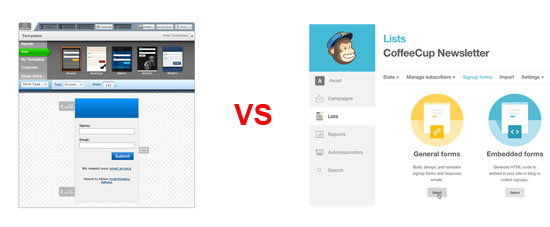
If you are a half decent web designer, you’ll definitely prefer Mailchimp over Aweber in terms of form design. MailChimp let’s you either design your forms entirely from scratch or use their GUI to design a professional looking form.
They have many templates to choose from, but if you want to do everything yourself, they also give you the raw code and you have full control over the look and feel of everything. I found that the design freedom that MailChimp provides was especially useful when designing popup forms.
Aweber on the other hand, seems to steer you towards using one of their pre-baked form templates. If you stray from their template, then you have to do a little bit of hacking to get things looking the way you want. For example, getting the popup signup form working on Aweber the exact way I wanted it to look took me several hours.
I basically had to download the javascript from their site, figure out how their code was written and then tailor it to how I wanted it. Otherwise, I would have been limited to their templates which I didn’t really like. In addition, the Aweber popup code didn’t work properly across all web browsers and I had to fix this manually. (Updated: This problem has been rectified)
Mailchimp also offers a more flexible interface with which to design HTML emails and they’ll also host the images for you. Aweber does not offer an image hosting service as far as I can tell (Updated: Aweber will now host unlimited images for you).
One annoying thing about Mailchimp that I wanted to mention is that you can have only one signup form per list. In Aweber, you can have as many forms as you want per subscriber list and you can track the performance of each one independently.
But with Mailchimp, all signup form code is the same for a given list as is the CSS. What this means is that you can’t really test different form designs and it’s kind of a pain to include multiple signup forms on the same page.
Overall however, I like MailChimp’s interface better even though their website is a bit slower than Aweber’s because of all of the graphical functionality baked into the UI.
Edge: MailChimp
Who Has Better Email Tracking?
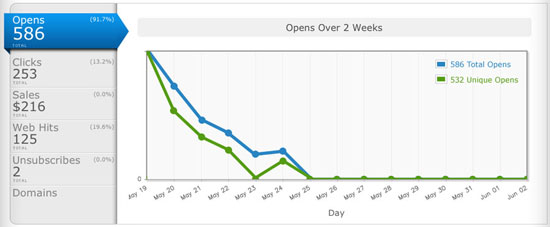
 When I first switched over from Mailchimp to Aweber, I immediately noticed how much better Aweber’s email tracking capabilities are compared to MailChimp.
With Aweber, you can tell exactly who has opened your email and exactly which links that they have clicked on and when. With Mailchimp out of the box, you don’t have any of this information. (Update: MailChimp has improved upon this such that the 2 services are now on par)
Instead, MailChimp puts stars next to each of your subscribers which provides a vague metric with which to measure the quality and interest of your readers. In addition, MailChimp does not track users who sign up for your newsletter but don’t confirm their email.
Aweber is also better when it comes to tracking clicks within an email. Whenever you use a link in an email with click tracking enabled, Aweber displays the link using the exact same URL from your domain. Mailchimp on the other hand, uses a super long and obscure link which is then redirected over to your site.
In general, readers are more hesitant to click on links with a super long and cryptic URL. With Aweber, the destination URL points straight to your domain and the click is still tracked. As a result, I’ve seen a dramatic increase in click throughs when I made the switch over to Aweber.
In addition to all of this, Aweber also provides conversion tracking if you sell products and you can also track how each reader traverses through your website from an email campaign.
One final super annoying thing about Mailchimp is that you can’t send an email to multiple lists at the same time. Therefore, if you want to send an email to more than one list, you have to replicate the email campaign and re-send each time. This can get very tedious.
Overall, Aweber is much more powerful than MailChimp when it comes to tracking users.
Edge: Aweber
Who Has Better AutoResponders?
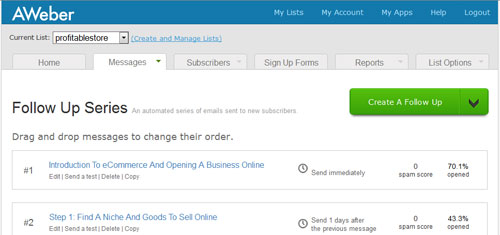
Both MailChimp and Aweber offer an easy way to set up a series of follow up emails. However, both have their pros and cons with the way their auto responders are implemented.
What I like about Mailchimp is that you can setup autoresponders such that only a subset of your email list will receive your follow-up emails based on when they signed up for your newsletter. For example, if I only want recent subscribers from the last month to receive one of my autoresponders, I can simply specify this using MailChimp’s autoresponder interface.
With Aweber however, this is not that easy to do. With Aweber, each and every one of your subscribers is tagged with a message number which indicates which followup emails they have received already. To prevent a subscriber from receiving a specific followup email, you must set the subscriber’s message number to be higher than the email sequence number.
For example, if a particular subscriber’s message number is 4, that means that that subscriber has already received follow-up emails 1,2 and 3. So if I have a 7 part follow up message sequence and I write a brand new followup email (message 8 in the sequence), there is no real way for me to prevent this subscriber from receiving message 8 unless I make his or her message number higher than 8. But if I do this, then that subscriber will never receive messages 4,5,6 or 7.
On the flip side, Aweber’s method of managing followup emails allows me to know exactly which subscriber has received which follow up emails and when. With MailChimp, I really have no clue who has or hasn’t received a particular email. Overall, I kind of prefer Aweber’s method of managing follow-ups but it is basically a wash depending on your preference.
Edge: Even
Who Has Better Support?
There is no contest here. Aweber has the better support hands down! Aweber offers both phone and email support during regular business hours. Mailchimp however, only offers email support.
As a result, if you have a pressing issue or question, you will have to wait up to 24 hours to get a response from MailChimp. This is the #1 reason I made the switch from MailChimp to Aweber. Usually support doesn’t come into play unless something goes wrong. Here is my tale of woe.
One day, MailChimp decided to arbitrarily suspend my blog from using its service. I received a cryptic email out of the blue telling me that my email service had been suspended and they didn’t give me a reason.
Since MailChimp doesn’t have phone support, I had to wait a day to receive a response. In fact, because I couldn’t get a human on the phone, it took me 2 days just to find out why I was suspended.
In the end, they told me that I had violated their terms of service because they classified my website as a get rich quick scheme. Long time readers of MyWifeQuitHerJob.com know that this blog is certainly not about getting rich quick. Plus, I didn’t sell anything on my blog at the time either so Mail Chimp’s reason for banning me was completely uncalled for.
In any case after a few emails back and forth, I found out that they basically didn’t like the title of my free ebook. Here is the exact email reply I received.
Hello Stephen,
https://mywifequitherjob.com/starting-your-own-business-does-not-have-to-be-risky/
which leads to How To Create A Profitable Online Store In 5 Easy Steps.
MailChimp does not allow content that references the terms “make money at home”, ‘get rich quick’, or other similar terms. These keywords overlap keywords used by ISPs and SpamCop organizations to block content associated with spammers from those industries. This generates too much risk for us to encounter automated spam filter blocks for all of our customers.
This isn’t an issue of the legitimacy of your business and we certainly don’t have anything personal against your content, however we do have to protect the deliverability of all our customers and the risk associated with these terms is too great for us to take on at this time. Here is a page with more information http://www.mailchimp.com/support/compliance/about-terms-of-use-violation?lptkt=LTK143038471765X
Unfortunately we do have to ask that you find another vendor for your email delivery needs. There are other ESPs that may be able to help you: http://email-marketing-service-review.toptenreviews.com/
Note: My blog is not about getting rich quick or making money from home. Sure, I could have changed the title of my ebook but I was not willing to make changes based on my email provider. As a result, I had to make a mad scramble to switch email providers right away.
In any case, Mailchimp has to do what they have to do in order maintain email deliverability and I don’t necessarily blame them.
But the key thing to note here is that they banned me without warning with absolutely no notice and the decision was final. Do you want to take this risk with your email provider?
Thankfully, the transition from MailChimp to Aweber was relatively easy and straightforward. In general, I think it’s better to start out with the right email provider from the start rather than having to switch later on.
Edge:Aweber
Mailchimp Vs Aweber
There are a few good things about MailChimp that I didn’t mention and should be considered as well even though most people probably won’t take advantage of these features. MailChimp has an interface that allows you to access your entire database of subscribers from an API.
If you do a lot of coding or database manipulation, their API will allow you to easily manage your subscriber database in PHP or any popular scripting language. Overall, when it comes to design and programmability, Mailchimp is more powerful than Aweber (Update: This is no longer true. Aweber also now offers a powerful API interface).
However, once I switched over to Aweber, I realized how much more powerful their tracking and email management features were compared to Mailchimp. You only have to design your forms once but tracking is something you’ll be doing all the time. In addition, the delivery rate of emails was better with Aweber as well which is extremely important.
In addition, having phone support is priceless. That and getting suspended without warning by MailChimp left a really bad taste in my mouth. If they simply gave me an early heads up, it would have made my life much easier. Trust me. There’s nothing more frustrating than not being able to get someone on the phone when something goes wrong.
Bottom line. Would you trust a crucial part of your business to a company that provides unresponsive customer service?
In any case, I highly recommend Aweber overall. If you do decide to go with Mailchimp however, I would read their terms of service extremely carefully before signing up.
One particular thing I want to highlight is that if you do any sort of affiliate marketing on your site, then I would stay away from MailChimp. In fact, here’s a list of Mailchimp alternatives.
After all, affiliate marketing appears to be against their terms of service. Any violation and you could be suspended without warning. It’s just not worth the risk.
Update: MailChimp refutes this claim about affiliate marketing saying that they only impose temporary bans when certain links in emails are blacklisted. What’s nice about AWeber is that they let you know BEFORE you send your email how likely your email will hit someone’s spam folder and whether you are accidentally using blacklisted links in your email.
Executive Summary
For those of you who don’t like to read and just want to cut to the chase, I’ve summarized the distinguishing features between the 2 services in the table below.
Aweber is the email marketing provider that I use for this blog and my other online businesses and I wholeheartedly recommend them.
Click Here To Sign Up For Aweber For Free
|  MailChimp Free limited trial. |
 | |