

When I first decided to start my own podcast, the benefits were already clear in my head.
- I already knew that having a podcast would expose me to an entirely new audience
- I already knew what I wanted to say and how I was going to run it
- I already knew that that I wanted to get started as quickly as possible
But here was the problem.
I had no idea about the mechanics of how to start a podcast.
I had no idea how to postprocess audio in order to make it sound great.
I had no idea what equipment to buy.
In addition, I did not want to pay someone $1000+ to teach me a bunch of extraneous info that I probably did not need.
For example, I already had a platform and a voice at MyWifeQuitHerJob.com. I already knew what I wanted to do. The only thing that I needed to learn was how to create and launch a high quality podcast in the shortest amount of time possible.
That is why I created this how to start a podcast tutorial. This podcast course is aptly named “The Most Comprehensive Free Podcast Tutorial Ever” because it is 100% free and it will teach you how to launch your own podcast right away within the next 2 hours.
Get My Free Mini Course On How To Start A Successful Ecommerce Store
If you are interested in starting an ecommerce business, I put together a comprehensive package of resources that will help you launch your own online store from complete scratch. Be sure to grab it before you leave!
Table of Contents
Why Is It Free?
 To be honest, my original plan when I first created this course was to charge $99 for it. But as soon as I got back from the Financial Blogging Conference, I had a sudden change of heart.
I have been so blessed over the years for being a part of such an incredible blogging community that I decided to pay the community back and give it away for free.
The only thing that I ask in return is that you consider…
- Listening to an episode of my podcast and leaving me an honest review on iTunes. Click here to leave me a review
- Using the various affiliate links embedded in this tutorial to make any podcast related purchases
- Sharing this podcast tutorial like crazy!
About This How To Start A Podcast Tutorial
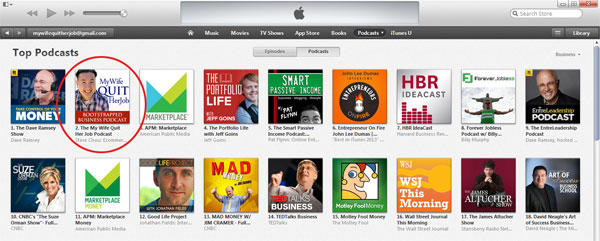
 Using the techniques described in this course, I launched my podcast and hit the #1 podcast in all of iTunes in the Business and Marketing category within 4 hours.
Being perched on top of the iTunes charts immediately gave me a ton of exposure and as a result, my blog traffic spiked and my blog income and email subscribers have since increased over 25%.
Launching a podcast is great way to reach a brand new audience and the best part is that you can keep your listeners engaged for up to an hour or more! Podcasting has had a profound effect on all of my online businesses and I’m happy to share the exact steps I took to achieve my success in this class.
Here’s what you’ll learn…
- Where To Begin – Learn how podcasting works and the common misconceptions about podcasting
- What Equipment To Use – Learn how to start a high quality podcast with a cheap mic and free software
- How To Record Your Podcast – Tips and tricks on how to record your podcasts
- How To Edit Your Audio For Quality – How to make your audio quality sound great even with a cheap mic
- How To Tag Your Audio For Upload – How to prep your audio file for submission
- How To Submit To iTunes – Learn everything you need to get your show on iTunes, Stitcher and other services
- How To Launch – Learn how to launch your podcast to the #1 spot.
Scroll down to begin the tutorial!
Welcome To Podcasting
What You’ll Learn In This Video
- How podcasting works at a high level
- The 3 main components of a podcast
- An overview of how to create your audio and what is required
- An overview of hosting options for your podcast
Mentioned In This Video
How To Install WordPress To Host Your Podcast
The easiest way to host your podcast is to do so using WordPress. Not only can WordPress host your blog but it can also generate the RSS feed for iTunes and Stitcher radio. I’ve written up step by step instructions below on how to start a WordPress blog in the easiest way possible and for the lowest possible cost using a reputable webhost.
Step #1: Sign Up For A Great Webhost
The first step is to sign up for a webhost. After all, you need to have a computer server in order to run your site. Personally, I recommend Blue Host. Now it’s often difficult to tell whether a webhost is reliable or not at first glance, but I can vouch for Bluehost because I ran my online store on Blue Host for over 2 years and they were fantastic. And the best part is that they only cost $4.95 a month!
- Go to Blue Host
- Click on the “SIGN UP NOW” button.
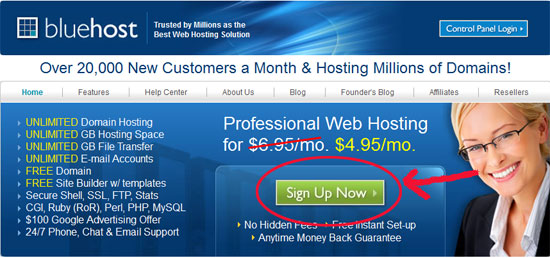
- Choose a domain. What’s nice about Blue Host is that they will give you a domain for free.
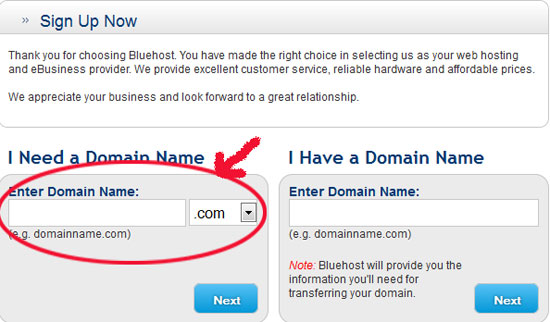
- Enter your account and billing information.
- Choose your hosting package. You will be given a choice of 12 months, 24 months or 36 months. The longer the time frame, the cheaper it will be.
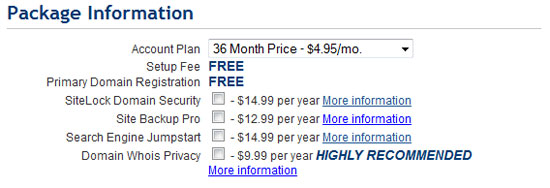
- Make sure you unclick all the stuff you don’t need. Trust me. You don’t need SiteLock Domain Security, Site Backup Pro or Search Engine Jumpstart
- Click Next. You will receive a confirmation in your email.
Step 2: Install WordPress
WordPress is by far the most popular blogging platform out there. And the best part is that you can install WordPress in a matter of just a few clicks on Blue Host
- Log in to your Blue Host account. Note: You should have received an email with your user id/password information. If you can’t find the login link, Click Here
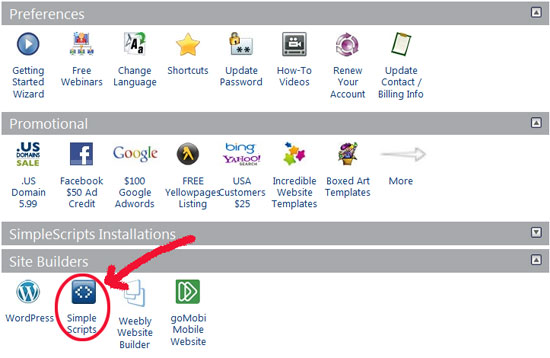
- Click the icon that reads “Simple Scripts” under the “Site Builders” in your cPanel.
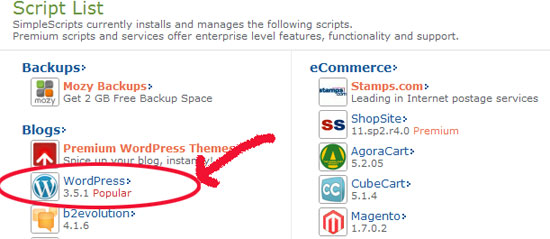
- Select WordPress to be installed
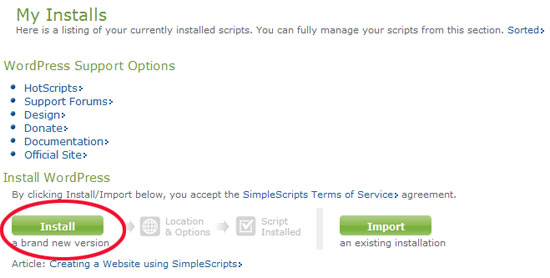
- Click on the “Install” button
- Enter your domain and fill in your blog name under “Advanced Options”. Make sure you uncheck all of the extraneous items.
Note: If you have Open Cart already installed in the root directory, you will want to place your blog in a subdirectory such as http://yourdomain.com/blog
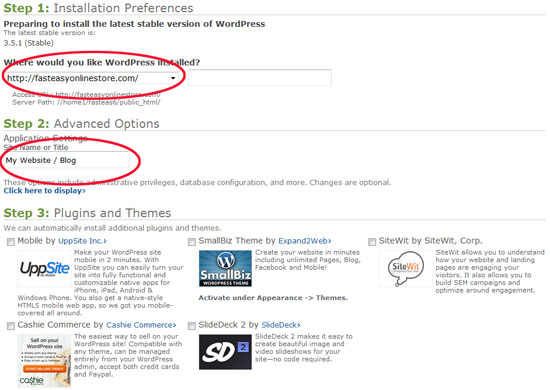
- Agree to Blue Host Terms of Service.
- Click “Complete”. Now WordPress has been uploaded to your domain!
Step 3: Login To Your Blog Backend
Once your blog is installed, you can login by typing in the following URL into your web browser.
http://yourdomain.com/wp-admin
Enter in your own username and password to begin the podcast RSS feed process!
Podcasting Equipment And Software
What You’ll Learn In This Video
- The three crucial elements to an successful podcast
- The software and equipment that you’ll need to begin
- Why audio quality matters
- Why you don’t need expensive equipment
- A list of recommended microphones depending on your budget
- How to record interview based podcasts
- Free software tools that you’ll need to download
Recommended Microphones
Recommended Software
Required Software – FREE
How To Record Your Podcast
What You’ll Learn In This Video
- How to setup the Pamela software to record an interview based podcast
- How to prepare your environment for recording.
Recommended Software
How To PostProcess Your Audio To Make It Sound Great
What You’ll Learn In This Video
- How to edit your audio
- How to make your audio sound incredible even if you are using a crappy mic
Required Software – FREE
A Complete Example Of How I Edit A Typical Podcast Episode
What You’ll Learn In This Video
- A complete example of how I edit a typical podcast episode
Required Software – FREE
How To Prepare And Tag Your Audio File
What You’ll Learn In This Video
- How to tag your audio files properly for upload
- What information you need to prepare ahead of time
Required Software
Preparing Your RSS Feed
What You’ll Learn In This Video
- How to create your RSS feed and host it on your own WordPress Blog
Mentioned In This Video
How To Launch Your Podcast To The Top Of iTunes
What You’ll Learn In This Video
- How to submit your podcast to iTunes
- Everything you need to know to have a successful launch
- How often you should post
- How to get maximum exposure to your podcast
- All the prep work required before you submit
A List Of All The Resources Mentioned In The Course
Recommended Microphones
Recommended Software
Required Software – FREE
Services
- LibSyn.com – a great place to host your podcast audio files
- Fiverr.com – a great place to have professional intros and outros created for your podcast

